On Page SEO for Ecommerce: A Shopify Checklist for 2026
- ecommerce on page SEO
- Shopify SEO
- product page SEO
- faceted navigation
- structured data
Launched
October, 2026
Online sales represented 27.0% of all retail sales in Great Britain in December 2024, according to the Office for National Statistics. Product and collection pages carry real commercial weight, so on page SEO for ecommerce needs to address more than keywords: shoppers must be able to understand the product, find delivery information and use the page.
Start With the Shopify Pages That Drive Revenue
Start with the templates that already attract search impressions and generate revenue. Catalogue size alone is a poor guide: a large product range can distract your team from a smaller collection with stronger buying intent.
Shopify page templates ranked by on-page priority
| Page template | Main on-page job | Common Shopify problem | Priority |
|---|---|---|---|
| Product pages | Win transactional searches with unique titles, specifications and offers | Manufacturer copy duplicated across stores and competing variant URLs | High |
| Collection pages | Capture category searches such as waterproof walking boots | Thin introductions and excessive crawlable filter combinations | High |
| Blog and guides | Answer research queries and direct shoppers towards relevant ranges | Thin posts without links to relevant collections | Medium |
| Delivery and returns pages | Answer operational questions before purchase | Policy text buried in the footer or loaded by JavaScript | Medium |
| Homepage | Signpost brands and main categories | Slideshow text missing from rendered content | Low for direct ranking |
| Filtered and sorted URLs | Keep crawl activity focused on useful canonical pages | Parameter pages indexed accidentally | Control, not optimise |
These are starting priorities, not fixed rules. A delivery policy attracting purchase-related searches deserves attention before a blog template nobody finds.
Build a template-level baseline
In Search Console, open Performance and filter pages by URL patterns such as /products/ and /collections/. Export clicks, impressions, CTR and average position, then group the URLs by template.
Match those groups against organic landing-page revenue in analytics. Keep the reporting dates and market consistent, and distinguish landing-page revenue from product sales: a collection can introduce a purchase without being the product ultimately ordered.
Inspect representative URLs from each group. A shared product template can have excellent metadata but omit every product's delivery metafield, which makes a template fix more useful than individual copy edits.
Prioritisation rule: Fix the shared output before polishing individual pages that inherit the same defect.
For a practical scoring exercise, give impressions, revenue and CTR opportunity a score from one to five. Score fix effort on the same scale, with a higher score meaning harder work, then subtract effort from the opportunity total.
Use the result to choose three template-level tasks for the first sprint. Treat the score as a decision aid, not a forecast of traffic or revenue.
Titles, Meta Descriptions and Headings That Earn Clicks
Edit the Shopify field, then inspect the storefront output. Themes and apps can append store names, replace headings or generate metadata that differs from what the admin preview suggests.
On-page snippet and heading elements in Shopify
| Element | Where it sits in Shopify | Target | Check before publishing |
|---|---|---|---|
| Title tag | Search engine listing on products and collections | Concise, with the buyer term first | Product term and useful differentiator appear before branding |
| Meta description | SEO description field | A compact, persuasive summary | Includes a benefit plus a visible stock or delivery detail |
| H1 | Product or collection title rendered by the template | One clear primary heading | Describes the page, not the store logo |
| Image alt text | Alt field on each product image | Enough detail to explain the image | Identifies the relevant variant without inventing attributes |
| URL handle | URL handle in the search engine listing editor | Short, descriptive and lowercase | Any change has a permanent redirect |
Character counts are editing aids, not display guarantees. Google can shorten or replace snippets, so don't sacrifice clarity to fill a character allowance.
Write for the query and the purchase
A hypothetical title change from Acme Outdoor Clothing | Acme to Men's Waterproof Trail Jacket in Olive | UK Stock gives the shopper a product type and a reason to investigate. Use the stock claim only if the page supports it.
Choose the buyer's terminology before writing. Grumspot's guide to keyword research for ecommerce can help distinguish a collection-level query from a specific product search.
A weak meta description says Explore our premium products today. A useful alternative says Stay dry on exposed trails with a waterproof olive jacket. Check available sizes and UK delivery options. It summarises the offer without promising fulfilment the merchant can't provide.
Meta descriptions aren't a direct ranking lever. Their job is to help a relevant shopper choose your result.
Make the template understandable
For the H1, replace a vague product name such as The Explorer with Explorer Men's Waterproof Trail Jacket. Use subordinate headings for sizing, materials, care and delivery, rather than formatting every section title as another primary heading.
For image alternatives, replace jacket image with Olive waterproof trail jacket, rear view. Include size only when the image clearly communicates it; a generic photograph doesn't become size-specific because a shopper selected a size.
For a new URL handle, prefer olive-waterproof-trail-jacket over an internal merchandising code. Don't rename an established URL merely to make it prettier, and verify Shopify's redirect option whenever a change is necessary.
In Search Console, investigate high-impression pages with weak CTR. Compare queries, position, device and search appearance before blaming the snippet: low rankings or shopping features can explain poor click-through even when the copy is sound.
How to Optimise Product and Category Pages
A UK audit reported that 41% of 200 leading retailers lacked key structured data, according to IT Brief's coverage of the retail audit. That's a useful diagnostic prompt, not a promised uplift from adding markup.
The workflow below keeps content, indexation and template validation connected.
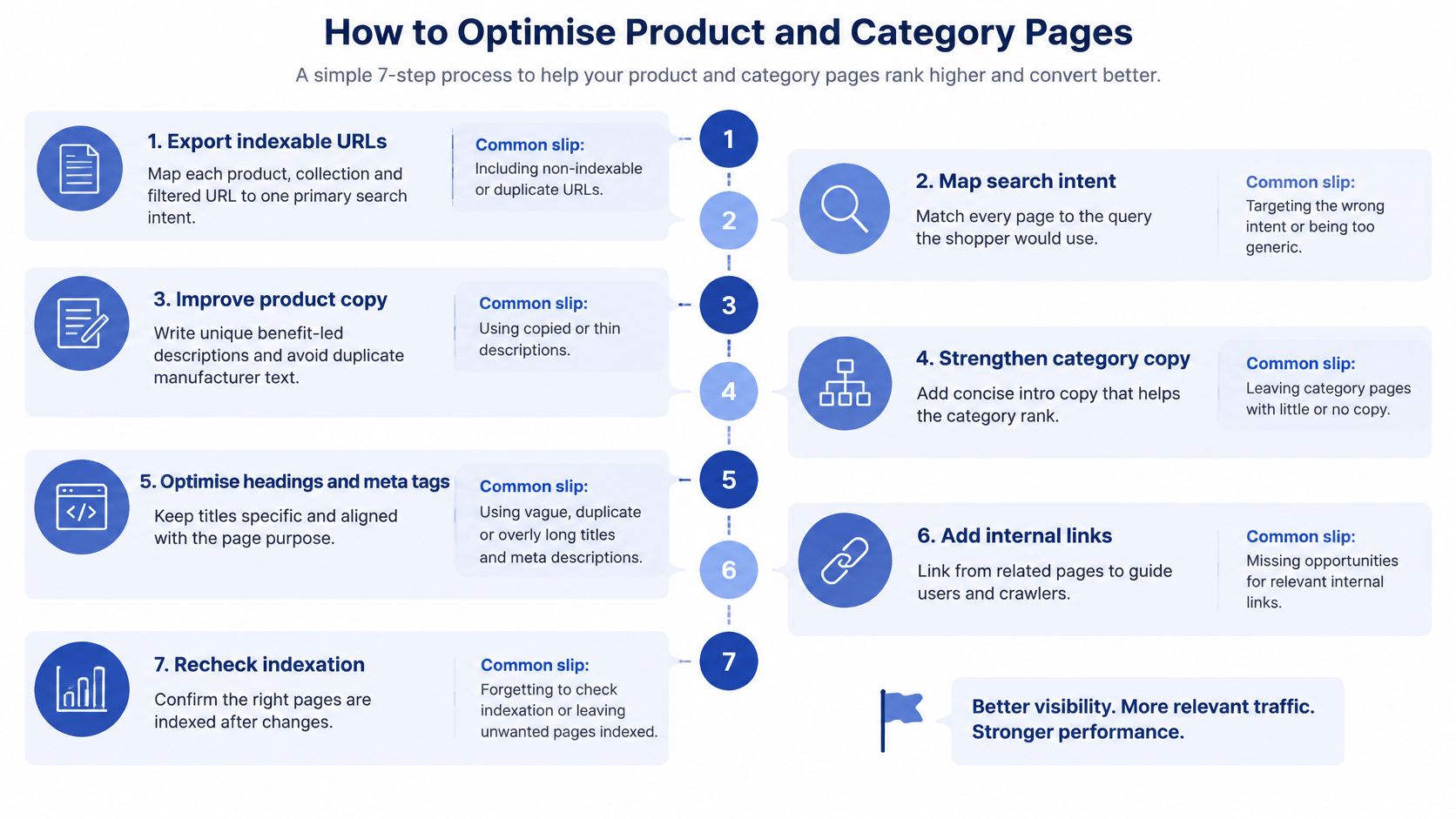
Export indexable URLs and assign intent. Crawl the storefront with Screaming Frog and combine the export with Search Console landing pages. Map products, collections and filtered URLs to their intended queries; the common slip is assigning the same broad category term to every product.
Choose the preferred product URL. Keep genuine product destinations indexable and self-canonical, then review collection-context paths, sort parameters and variant duplicates. Don't assume every variant needs an independent search landing page.
Rewrite titles and primary headings. Use the UK buyer's product term and a meaningful differentiator. Manufacturer terminology can remain where technically necessary, but copying the manufacturer's entire presentation gives shoppers little reason to choose your page.
Write descriptions that answer buying questions. Explain specifications, compatibility, use cases and availability alongside fulfilment information. For collections, add concise selection advice and links to useful subcategories; don't push the product grid down with generic keyword paragraphs.
Put delivery and returns beside the buying decision
According to DHL's UK ecommerce report, three in four UK shoppers abandon baskets when preferred delivery and returns options are unavailable. Product-page content should therefore explain what happens after the shopper buys, not leave every operational question until checkout.
Show delivery geography, expected speed, costs, collection options and return routes in crawlable text. Answer practical questions such as whether parcel-shop returns are available or whether Northern Ireland delivery has different conditions.
Use product metafields for exceptions and shared theme blocks for standard policies. Connect those blocks through dynamic sources where appropriate, rather than pasting policy text into every description.
An accordion is fine if its content is present in the rendered page and its controls work with a keyboard. Avoid modules that fetch essential information only after a shopper clicks.
Connect product facts to structured data. Map price, GBP currency, availability, brand, identifiers, images and eligible review information to their actual Shopify sources. The common slip is letting a separate app maintain facts that drift away from the visible offer.
Validate the template output. Run representative URLs through Google's Rich Results Test and inspect rendered HTML with URL Inspection. Test available, sold-out and variant-heavy products, not just the simplest item in the catalogue.
Monitor the landing-page result. Track impressions, clicks, CTR, indexed URLs, rich-result eligibility and revenue together. More indexed URLs aren't automatically progress if the increase comes from unwanted parameters.
Choose a template with meaningful UK impressions, weak click-through and a clear defect. Change a single test variable where possible so you can interpret the result; urgent correctness fixes shouldn't wait for a tidy experiment.
Faceted Navigation, Pagination and Internal Links
Give each distinct category intent a preferred collection destination. Consolidate near-duplicate filtered and sorted views, but preserve paginated pages that shoppers and crawlers need to reach deeper products.
This diagram provides a useful reference when reviewing the collection journey.
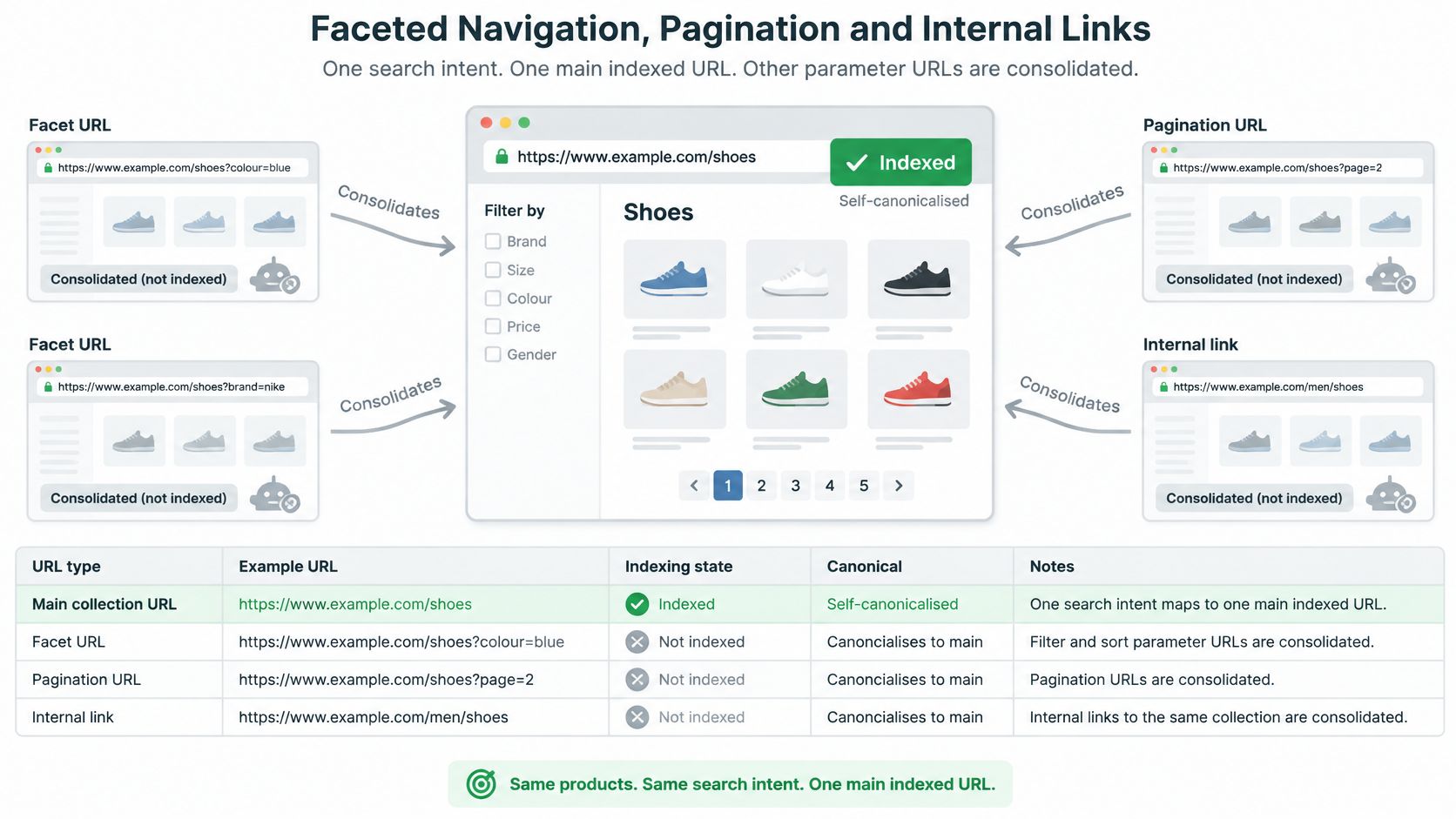
Indexing decisions for Shopify collection URL states
| URL state | Example pattern | Recommended action | Reason |
|---|---|---|---|
| Main collection | /collections/running-shoes |
Index, self-canonical | Primary search intent |
| Single filter with search demand | /collections/running-shoes?filter.v.option.colour=black |
Index only with demand and distinct content; otherwise consolidate where appropriate | Avoids thin near-duplicates |
| Sorted view | /collections/running-shoes?sort_by=price-ascending |
Canonical to the base collection | Same products, different order |
| Paginated page 2 and beyond | /collections/running-shoes?page=2 |
Self-canonical with crawlable product links | Preserves distinct product-list pages |
| Internal search results | /search?q=running+shoes |
Noindex when crawlable | Thin, unstable results |
Decide which filters deserve a landing page
A colour filter deserves consideration when shoppers search for that combination, the range supports it and the page offers a distinct selection. A dedicated collection is often easier to maintain than conditional metadata and copy on a parameter URL.
Don't make every filter indexable because it technically works. Size, colour and price combinations can produce near-identical destinations with little independent value.
Canonical tags are signals, not removal commands. Where a filtered subset differs substantially and must stay out of search, assess a crawlable noindex implementation rather than assuming a canonical will always consolidate it.
A useful filter for shoppers isn't automatically a useful landing page for search.
Paginated collections need self-referencing canonicals and ordinary links to products and adjacent pages. Canonicalising later pages to the first page incorrectly presents distinct product lists as duplicates and can complicate discovery.
Don't rely on rel="next" and rel="prev" to solve indexing. Infinite scroll still needs accessible paginated URLs behind it, with products reachable without a scroll-triggered request.
The accompanying walkthrough offers another way to review the navigation setup.
Link deliberately and control crawling carefully
Link collection copy to relevant best-selling and new products using names such as women's wide-fit trail shoes, not view item. Give guides contextual links to the ranges they help shoppers choose, following a deliberate internal linking strategy.
Breadcrumbs should reflect a stable category hierarchy. Avoid changing their destination unpredictably according to the shopper's previous click.
Review Shopify's existing robots rules before editing robots.txt.liquid through the theme code editor. Preserve the default rules, and add narrowly scoped restrictions only for confirmed low-value crawl patterns.
Blocking crawling doesn't remove an indexed URL. A crawler must access a page to read its noindex directive or canonical, so don't block pages while expecting those instructions to be processed. Check representative URLs and the Page indexing report in Search Console after deployment.
Structured Data and Speed Checks for Shopify Templates
Never mark a sold-out offer as InStock, and never publish review markup for reviews shoppers can't see. These correctness rules matter more than adding every optional schema property.
Inspect both page source and rendered output. Shopify themes may already generate JSON-LD, while review or SEO apps can add overlapping entities with conflicting prices or availability.
Give each template a clear markup owner
Use this output map when assigning responsibility between the theme and apps:
- Product pages: Product information should include the name, image, brand and genuine SKU or GTIN identifiers, with reviews where eligible.
- Offers: Price, currency and availability must match the offer visible to the shopper.
- Breadcrumbs: BreadcrumbList should reflect the visible navigation.
- Homepage: Organization markup should describe the actual business consistently.
Don't delete all theme markup because an app also emits JSON-LD. Identify which component owns each entity, remove conflicting duplication and validate the final graph. Grumspot's structured data implementation guide provides a starting point for planning that ownership.
Fix speed in the order shoppers experience it
Measure real-user Core Web Vitals by device and template in Search Console or CrUX before changing assets. Use lab testing to diagnose the problem, not as a substitute for field experience.
- Largest Contentful Paint: Serve correctly sized WebP or AVIF images and preload only the LCP asset. Don't lazy-load the above-the-fold product image.
- Interaction to Next Paint: Defer non-essential app code, remove overlapping tags and split long JavaScript tasks. Check whether disabling an app embed removes its storefront requests.
- Cumulative Layout Shift: Reserve space for images, banners and review widgets, and use font-loading choices that minimise text movement.
Google's retail speed report found that a 0.1-second improvement in load time produced an average 8.4% conversion increase for retail users. That's a conversion finding, not a guarantee of an equivalent organic-ranking improvement.
Retest on representative UK mobile connections after deployment. Check gallery use, variant selection and add-to-cart interactions, not just the initial screen.
Include an accessibility pass
A 2026 Accessimo study of 115 UK ecommerce websites found that 97.4% had at least one critical or serious accessibility issue. It was a snapshot, not a census, but it gives merchants a strong reason to inspect shared components.
Check text contrast, landmark regions, descriptive link wording, filter labels and keyboard operation. Confirm that selected variants, stock changes and validation messages are understandable through assistive technology.
Release check: A template isn't ready merely because it looks correct in a desktop screenshot.
Run Your Shopify On-Page SEO Checklist
Treat this as a release checklist, with an owner and evidence against each group. A completed ticket should identify the changed template, tested examples and any remaining exceptions.
Use the visual checklist to keep content and technical work in the same sprint.
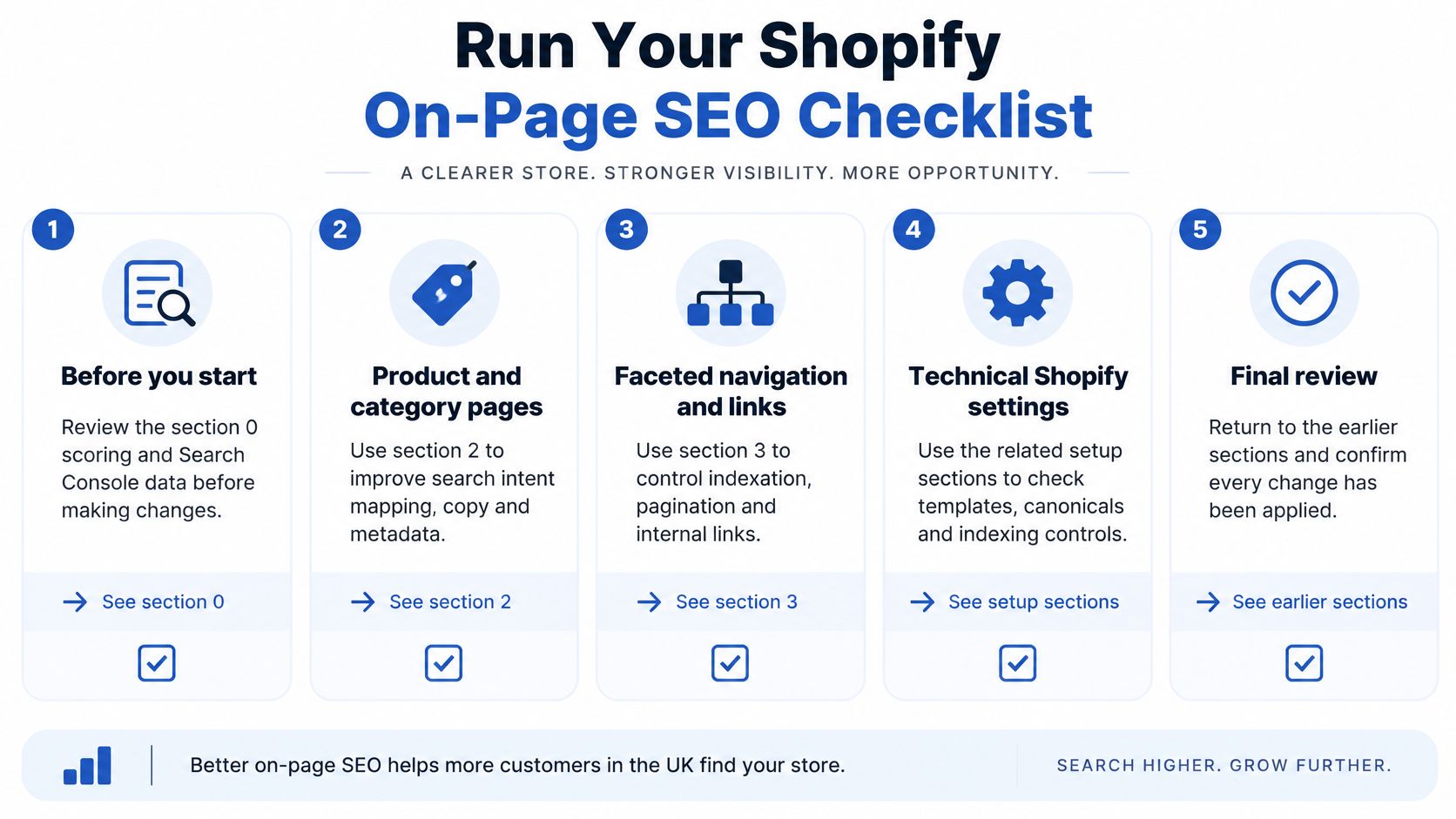
Check off the release groups
- Before you start: Complete the scoring and Search Console export under Start With the Shopify Pages That Drive Revenue. Confirm analytics attribution and record the selected template's baseline.
- Templates: Apply the snippet checks under Titles, Meta Descriptions and Headings That Earn Clicks and the content workflow under How to Optimise Product and Category Pages. Test shared blocks with populated and missing metafields.
- Structure: Use the URL-state decisions under Faceted Navigation, Pagination and Internal Links. Include a deep collection page and a filtered journey in the test set.
- Markup and speed: Apply the ownership and performance checks under Structured Data and Speed Checks for Shopify Templates. Record the theme version and active app embeds so regressions are traceable.
- Verification: Save Rich Results Test outcomes, inspect representative URLs and monitor the Page indexing report. Compare CTR and organic landing-page revenue after Google has recrawled the changed pages.
If a campaign requires a separate landing-page workflow, Landra's landing page platform is a resource to assess alongside your Shopify setup. Before introducing another publishing tool, establish who owns its URLs, analytics, canonical settings and route back to the catalogue.
Our Shopify Audits cover design, technical and SEO. The SEO health check reviews metadata, headings, URL structure, sitemap and structured data, which helps connect editorial fixes with the theme settings that control their output.
Organise a manageable sprint
A practical sprint could begin with an audit week: collect exports, inspect representative pages and rank the opportunities. Assign a developer where the fix affects Liquid output, rather than handing every issue to the content team.
Use the following week to implement the highest-priority template change on a duplicate theme. Preview products with different stock states, long names, missing optional fields and unusual delivery conditions before publishing.
During the next fortnight, isolate further test variables and monitor implementation health. Don't mistake early movement for proof: promotions, stock availability and changes in query mix can affect both CTR and revenue.
Schedule an initial comparison after four to six weeks as a working review window, not a promised SEO turnaround. If recrawling is incomplete or demand has changed materially, keep monitoring rather than declaring the test successful or unsuccessful.
Before the first change, record baseline CTR, indexed page count and organic landing-page revenue for the chosen template. That gives the review a comparison point instead of relying on whether the storefront feels improved.
Grumspot offers Shopify Audits covering design, technical and SEO, helping your team connect page content with the templates and settings behind it. Visit Grumspot to discuss an audit and identify which product or collection template deserves the first fix.
Let's build something together
If you like what you saw, let's jump on a quick call and discuss your project
Related posts
Check out some similar posts.

- on page SEO
On Page SEO Services explained: the deliverables, Shopify process, template speed and accessibility ...
Read more
- seo technical audit checklist
Use this SEO technical audit checklist to find and fix 10 ecommerce issues across crawling, speed, i...
Read more
- structured data
Master structured data implementation for ecommerce in 2026. Practical JSON-LD, Microdata, schema se...
Read more
- internal linking strategy
Build a high-impact internal linking strategy that boosts rankings and conversions. Learn auditing, ...
Read more