Choosing an SEO App for Shopify: A Merchant Playbook
- shopify seo
- seo app for shopify
- shopify plus
- ecommerce seo
- technical seo
Launched
September, 2026
Most Shopify merchants are told to install an SEO app before they've identified an SEO problem. That advice is backwards. Shopify already provides a solid technical baseline, and adding an app can introduce duplicate markup, theme friction, recurring fees, and storefront scripts that deliver little beyond fields you already control.
The UK market makes this decision worth taking seriously. Independent reporting estimates 229,598 active Shopify stores in the UK in Q2 2026, with quarter-over-quarter growth of 6.1% and year-over-year growth of 8.0%. England alone accounts for an estimated 202,499 live stores, including 51,983 in London and 5,123 in Manchester (UK Shopify ecommerce market reporting). Competition is dense, but more tooling isn't automatically the answer.
This playbook uses a stricter question: what specific SEO gap exists, who should own the fix, and what performance debt will the app create?
| Decision | Best fit | Main reason to choose it | Main risk |
|---|---|---|---|
| No SEO app | Small catalogue with a capable theme | Native Shopify controls cover the need | Manual work grows with catalogue complexity |
| One focused app | Growing catalogue or recurring audits | Consolidates automation and reduces overlap | Plan limits or unwanted script injection |
| Specialist app | A clear structured-data, image, or redirect gap | Solves a defined technical problem | Narrow tools can overlap with native features |
| Custom utility | Shopify Plus, complex markets, or high SKU volume | Gives precise control over data and workflows | Requires development and ongoing ownership |
Why the App Question Is the Wrong Starting Point
Every Shopify store doesn't need an SEO app. Installing one first is often a way to avoid diagnosis, not a way to improve search visibility.
Start by identifying the failing layer. Is the issue weak product copy, inconsistent collection titles, missing structured data, poor image handling, indexation control, or an inefficient theme? Each problem belongs somewhere different. Shopify admin may handle it. A Liquid template may handle it better. A small custom utility may be safer than a monthly subscription.
The UK opportunity is commercially meaningful. UK online retail sales reached £127.41 billion in 2024, up from £123.3 billion in 2023, and online channels represented 28% of all UK retail sales (UK ecommerce performance and Shopify store data). That makes organic visibility valuable, but it also makes performance and operational control part of the SEO decision.
Three reasons an app may be justified
An app earns its place when it solves a problem that native Shopify functionality and your theme can't handle efficiently.
- Catalogue scale: Bulk title, description, image, or audit workflows can justify automation when manual editing becomes a bottleneck.
- Technical debt: A legacy theme, inconsistent templates, or a migration may leave gaps that require repeatable monitoring.
- Missing structured data: If the rendered storefront lacks required or useful schema, a focused structured-data tool can be appropriate.
The opposite triggers matter just as much. If you have fewer than 50 products, native fields and a well-built theme may be enough. If Shopify already covers the function, an app adds administration without solving a real gap. If your theme can output the required markup cleanly, don't install an app merely because its feature list includes “schema”.
Practical rule: Install an SEO app only when you can name the missing capability, the affected URL set, and the owner responsible for checking the result.
The right outcome may be no app, one consolidated app, or a custom implementation. Treat the app as an implementation choice after the audit, not as the audit itself.
What Shopify Already Handles Before You Install Anything
An SEO app should not be your first response to a ranking problem. Shopify already supplies much of the technical foundation that merchants often buy through an app, including canonical tags, XML sitemaps, robots.txt, SSL, and theme-generated title tags, as described in Shopify's roundup of SEO apps. Installing another layer before checking that foundation creates avoidable overlap and can complicate ownership.
Shopify also provides editable title and meta description fields for products and collections. Themes determine how those values appear in the storefront. Canonicals usually need inspection rather than manual replacement, unless a custom theme, template, or app creates conflicting output. Redirects, structured data, and market-specific behaviour require verification, but treat them as audit items, not automatic reasons to install software.
Start with an inventory of the live store:
- Field-driven elements: Identify the product, collection, page, and article fields that editors can change directly.
- Template-driven elements: Inspect Liquid templates for title tags, headings, breadcrumbs, product JSON-LD, organisation data, and collection metadata.
- Platform-generated elements: Check canonical output, sitemap content, robots.txt, SSL, and redirect behaviour on the storefront.
- Unresolved gaps: Keep only issues that Shopify, the theme, or an existing integration does not handle reliably.
For large catalogues, Liquid often provides better control than app fields. One template rule can govern many URLs without creating thousands of stored edits. It also makes ownership clear: editors can identify the source of a value, while developers can review changes as part of a theme release.
| SEO element | Native coverage | Action required |
|---|---|---|
| Canonical tags | Shopify generates them automatically | Inspect exceptions and conflicts |
| XML sitemap | Shopify generates it automatically | Check included URL types and indexing strategy |
| robots.txt | Shopify provides a generated file | Customise only for a documented requirement |
| SSL | Shopify includes SSL for storefronts | Confirm all live assets use secure URLs |
| Product and collection metadata | Editable fields are available | Set governance and template fallbacks |
| Title tags | Shopify and themes provide baseline output | Review templates for duplication and truncation |
| Product structured data | Usually theme-generated | Validate the rendered HTML and avoid duplicates |
| Breadcrumb and organisation data | Often theme-dependent | Confirm the theme's actual output |
| Image optimisation | Partly theme and platform dependent | Use native controls, theme work, or a focused tool |
| Bulk editing and audits | Limited natively | Consider an app or custom utility only if scale requires it |
Coverage versus governance is the deciding distinction. A native capability can still produce poor SEO when templates, content fields, and apps apply it inconsistently. Document who owns each element, how changes are tested, and which gaps justify an app. If the audit finds no material gap, leave the app out.
Comparing the Criteria That Separate Shopify SEO Apps
Feature lists have converged. Established Shopify SEO apps commonly offer metadata editing, image optimisation, audits, redirects, schema, or several of these functions together. The meaningful differences emerge after installation, when the app affects your theme, data model, release process, and catalogue.
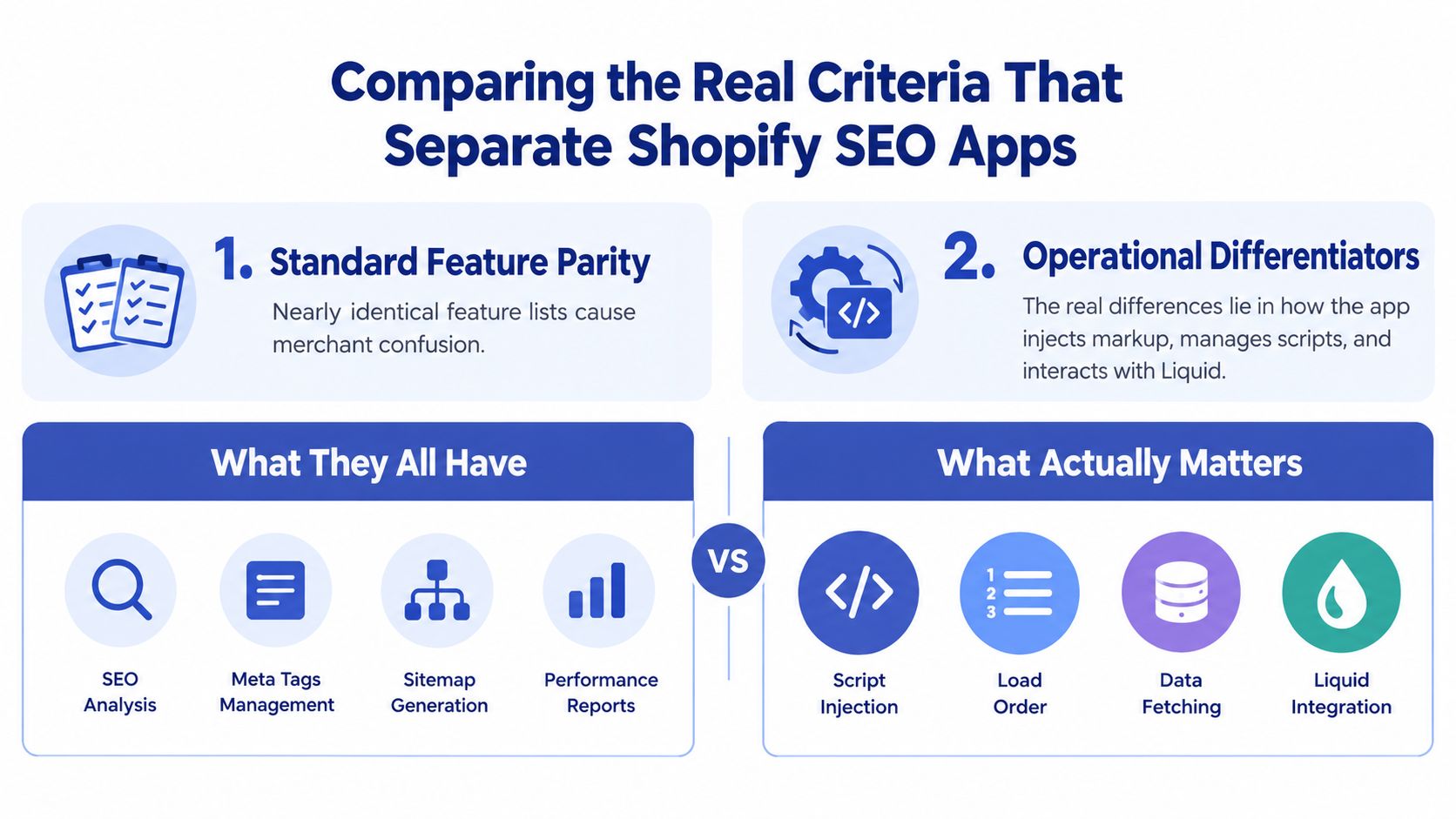
Compare ownership, not checkboxes
An all-in-one suite suits a team that needs bulk metadata, image handling, audits, and structured data in one interface. Consolidation is its main advantage. The trade-off is extra functionality, code, and ownership complexity when the store needs only one narrow fix.
Choose a structured-data specialist when the gap is clearly defined. Confirm whether it writes JSON-LD into rendered HTML, relies on JavaScript after page load, or modifies theme files. Judge a redirect manager by its import, export, review, and rollback workflows, not by the presence of a redirect screen. An image optimiser should document exactly what it changes and whether original assets remain recoverable.
Review these operational details before approval:
- Markup injection: Does the app use server-rendered output,
theme.liquid, an app embed, or JavaScript hydration? - Data ownership: Does it write to Shopify product fields, store values in its own database, or maintain a separate metadata layer?
- Bulk ceilings: Can it process the full catalogue, or does the useful workflow stop at a lower plan?
- Exit path: After uninstalling, do titles, descriptions, schema, redirects, and settings remain intact?
Plan limits matter particularly for large UK catalogues. SearchPie advertises daily monitoring and compression or minification for 50 images on lower tiers, while higher plans advertise 500 images, unlimited compression, and up to 5,000 AI-generated SEO tags. Those limits matter more than a long feature list when your catalogue is large.
Plug in SEO's top plan includes unlimited page scans, unlimited speed and performance reports, and AI deep keyword research for 2,000 pages, while Smart SEO's higher tiers add bulk metadata optimisation, bulk image optimisation, noindex controls, and automated audits (Plug in SEO on the Shopify App Store). Compare these ceilings with your actual URL inventory. A plan that looks generous in a pricing table can still stop short of your working catalogue.
Check platform compatibility
Shopify Plus teams should test checkout extensibility separately from storefront app behaviour. A storefront SEO app may leave checkout untouched while still interfering with theme embeds, analytics, or release workflows. Hydrogen and other headless builds require a stricter review because a theme-based app may not control the rendered head or product data at all.
Avoid apps that mutate fields without a clear namespace or change log. Two tools writing to the same title, description, canonical, or JSON-LD output create ownership confusion. If the audit identifies no material gap, a focused custom utility, or no app, is often the better decision.
The Performance Cost You Accept Every Time You Add a Script
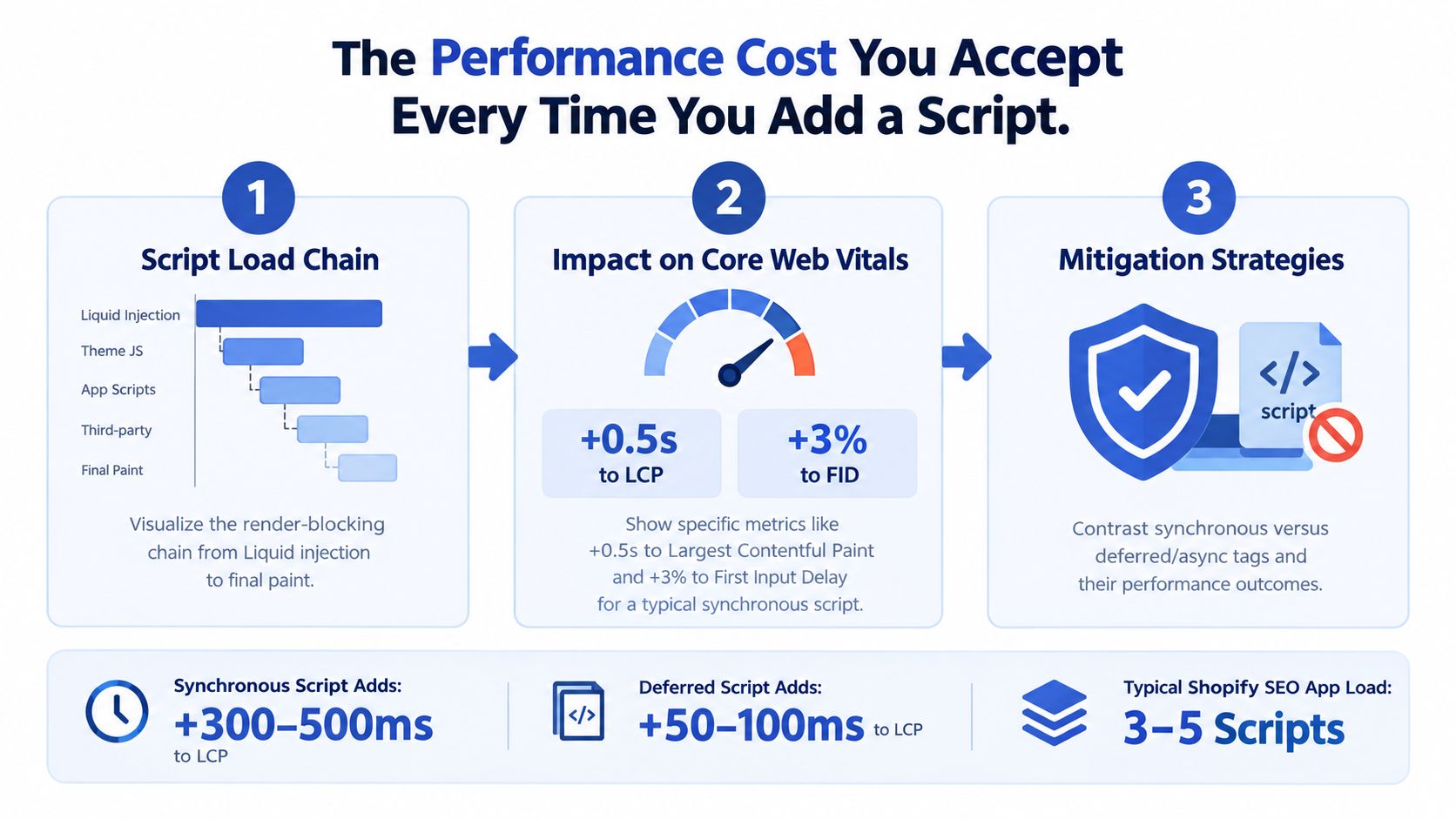
Treat every storefront script as a liability until testing proves its value. An SEO app can provide audits or structured data while adding requests that compete with theme assets, analytics, review widgets, consent tools, and merchandising code.
An app embed or theme.liquid inclusion joins the browser's loading chain. It may fetch dependencies, execute on the main thread, and modify the page after the initial HTML arrives. Synchronous code can delay rendering. Deferred code lowers that risk, but unused JavaScript still adds transfer, parsing, and maintenance cost.
Industry reporting on Shopify stores estimates that every additional 100 milliseconds of load time can reduce conversion by about 3.5%, while a 2.5-second Largest Contentful Paint can mean roughly 30% lower conversion than a 1.5-second load. Treat those figures as a measurement prompt, not proof that one app caused a revenue change. Test the storefront before and after installation.
Find the actual offender
Use a duplicate theme or controlled preview with the same template types and representative products. Record the baseline first, then inspect what the app changes:
- Network waterfall: Find new requests in the document head and check whether they block rendering.
- Main-thread activity: Use Chrome DevTools Performance to identify long tasks and script execution during the first render.
- Coverage: In DevTools Coverage, check how much of each new JavaScript file the page uses.
- Third-party cost: Use WebPageTest's third-party summary to identify the vendor responsible for requests and execution time.
- Field performance: Compare real-user results with Grumspot's Core Web Vitals optimisation guidance and Lighthouse. Lab testing cannot represent every visitor or device.
Audit output ownership before approving another install. Three apps generating Product schema, canonical tags, or audit scripts create conflicts and make releases harder to diagnose. Teams assessing how to reduce app bloat for Shopify Plus should assign one owner to each SEO output and remove duplicate functionality.
A storefront app must justify its runtime cost with a capability you cannot deliver more safely through Shopify, your theme, or a focused custom utility. If it only edits fields Shopify already exposes, keep it off the storefront or skip the installation.
Reading Pricing as a Function of Catalogue Size
The monthly pound figure is a poor basis for choosing an SEO app. Pricing must match how many URLs the app scans, how often it scans them, how many images it processes, and whether keyword or locale limits fit the operation.
Catalogue size changes the effective price. A small store can pay for a broad suite while using only metadata fields. A larger store may select a cheaper plan, then discover that its audits exclude important products or collections. As noted earlier, SearchPie's plans illustrate how image processing and AI tag capacity vary by tier. The useful question is the workload the plan can complete, not the length of its feature list.
At 10,000 SKUs, an overage policy can change the decision. A plan that appears affordable may charge for additional scans, restrict processing to part of the catalogue, or require a higher tier before the app can cover every product. Export restrictions create another cost: if metadata or recommendations cannot be downloaded cleanly, replacing the app later requires manual recovery. Ask for the full cost at your actual catalogue size before installation.
Build a capacity model
Record your current and expected:
- Product URLs
- Collection URLs
- Blog and content URLs
- Image assets
- Target markets and locales
- Audit frequency
- Editors or developers requiring access
Match that workload against each plan's ceilings. Premium SEO apps commonly sit around £9 to £39 or more per month in UK-focused comparisons (UK Shopify SEO app roundup). The range has meaning only when you connect it to URL coverage, processing limits, monitoring frequency, and user access.
| Tier | URL or product limit | Audit frequency | Approx monthly GBP | Best fit |
|---|---|---|---|---|
| Entry | Limited catalogue and image processing | Basic or scheduled checks | About £9 | Small stores with a narrow gap |
| Growth | Higher URL and image ceilings | Regular monitoring and bulk actions | Mid-range | Growing catalogues with one clear workflow |
| Advanced | Large or unlimited processing, deeper research | Frequent audits and broader controls | About £39 or more | Shopify Plus and complex catalogues |
These categories support planning, not vendor comparison by themselves. Check the current pricing page, export rules, scan coverage, and overage policy before buying.
Migration also belongs in the calculation. If an app stores metadata in its own database, removal or a platform move may require exports and manual reconciliation. Price the exit as well as the subscription. At scale, a focused custom utility, or no app, can cost less and leave fewer dependencies.
Migration and Implementation Decisions Before You Commit
A platform migration or theme rebuild exposes every hidden SEO dependency. Teams often install a new app on launch day, then discover that the old stack owned redirects, schema, metadata, or locale logic that nobody documented.
Before changing code, crawl the live store and save representative HTML from products, collections, pages, articles, and market versions. Record canonical output, indexation directives, structured data, titles, descriptions, internal links, and redirects. This baseline gives developers something concrete to compare after the cutover.
Assign ownership before the rebuild
Create a responsibility map with one owner for each output:
- Canonicals: Shopify or the theme, with exceptions documented.
- Sitemaps and robots.txt: Shopify unless a specific custom requirement exists.
- Structured data: Theme snippets, an approved app, or custom code, never an undefined combination.
- Redirects: Shopify's redirect system or an imported mapping managed by a named owner.
- Metadata: Shopify fields, theme fallbacks, or one controlled app.
Merchants moving from Magento, WooCommerce, or a custom platform need to look beyond URL redirects. The old system may have supported hreflang, product schema, filters, or metadata relationships that Shopify won't reproduce automatically. International stores need to verify canonical and locale behaviour for each market, especially where product availability and translated content differ.
The Shopify migration guide from Grumspot is useful as a planning reference, but the implementation should be based on your own crawl and source-system export.
Use a phased release
Before cutover, freeze the redirect map, capture the baseline, and decide which app functions belong in the new theme. Test structured data and metadata on a duplicate theme.
During cutover, deploy the theme, redirects, market settings, and approved app embeds as one controlled release. Don't add unrelated SEO tooling while the team is still checking whether the platform is indexing the correct URL set.
After launch, monitor index coverage, crawl errors, canonical selection, rich-result eligibility, template output, and performance for the first 30 days. Add an app only when the post-launch evidence identifies a gap that native Shopify and theme code can't handle.
Which Setup Fits Which Type of Merchant
The right setup depends on catalogue complexity, release discipline, market structure, and who can maintain the implementation. A merchant with a small catalogue shouldn't inherit the operational burden of a Plus-grade SEO suite. A high-SKU international brand shouldn't rely on manual metadata edits just because the native admin is available.
| Merchant profile | Catalogue size | Recommended setup | Trigger to change |
|---|---|---|---|
| Solo founder | Under 50 products | Native Shopify controls, with no app or one focused metadata tool | Manual edits become inconsistent |
| Growing brand | Moderate and expanding | One consolidated scanner or structured-data app | Audit coverage or bulk work exceeds plan capacity |
| Established retailer | Large catalogue | One app with verified bulk workflows, or custom utilities | Conflicting outputs, slow audits, or repeated plan upgrades |
| Shopify Plus operation | High SKU volume or multiple markets | Custom implementation, carefully selected app, or headless architecture | Locale governance and release control become complex |
| Migrating retailer | Any size | Native baseline first, app after migration verification | Legacy schema, redirects, or hreflang fail testing |
A solo founder should resist the full-suite pitch. Native fields plus a clean theme often cover the immediate need, and a focused tool can be added later if bulk work becomes repetitive.
A brand with regular collection changes needs monitoring and structured-data confidence. Consolidate those functions where possible. Running separate tools for metadata, schema, redirects, and image compression creates more ownership questions than value unless each tool has a sharply defined boundary.
High-SKU catalogues, faceted navigation, and multiple markets are different. Plan ceilings, locale variants, canonical governance, and theme release processes can make a custom utility safer. UK agency guidance increasingly treats app transparency, Core Web Vitals, variant canonicals, and international behaviour as audit criteria rather than optional extras (UK Shopify SEO app review).
For merchants evaluating broader strategy, Wispra's SEO consultant guide offers another perspective on the role of technical and commercial SEO work. If your team is also investing in creating SEO-backed video content, keep ownership of titles, structured data, and page templates separate from content production workflows.
Grumspot provides Shopify store audits, migration work, theme development, and custom app engineering, which can suit merchants whose requirements exceed an off-the-shelf app's data model or plan limits.
The 15 Minute SEO App Evaluation Checklist
You can reject unsuitable apps quickly. Ignore the feature list at first. Inspect storefront behaviour, data ownership, and the exit path.
Minutes one to four, inspect runtime behaviour
Read the documentation and test the demo or trial implementation. Confirm whether scripts use async or defer, whether the app injects code into the head, and whether storefront assets load across every page or only relevant templates.
Run Lighthouse on a representative product page and collection page before and after a controlled install. Record changed requests, execution time, and Core Web Vitals. If the app lacks a safe staging workflow, treat that as an implementation warning.
Minutes five to eight, find ownership conflicts
List every installed app that changes:
- Product titles or descriptions
- Canonical tags or noindex directives
- Product, review, breadcrumb, or organisation schema
- Image URLs, alt text, or compression
- Redirects, sitemap references, or market settings
Render the HTML rather than relying on the admin preview. Confirm each output appears once, contains accurate values, and remains available without client-side delays where rich-result eligibility depends on it.
Minutes nine to twelve, read the limits
Check URL, product, image, audit, keyword, and locale ceilings on the pricing page. Review export restrictions, catalogue-growth plan changes, and whether uninstalling removes or preserves metadata. Ask support one technical question about a current app conflict. The answer's accuracy and speed reveal more than a polished feature page.
Minutes thirteen to fifteen, assess the wider workflow
Review permissions, data access, uninstall instructions, and documented theme changes. If the app auto-generates meta descriptions from product copy, spot-check five outputs for accuracy before approving the install. For content teams, confirm the tool supports useful publishing instead of rewarding volume without quality.
Apply a clear rule: if an app fails two or more checks, don't install it. Use native Shopify settings, theme code, or a different vendor instead. For a deeper pre-install review, apply the Shopify technical SEO audit checklist to the storefront and the app's rendered output.
Grumspot audits Shopify and Shopify Plus storefronts for technical SEO gaps, app conflicts, theme performance, structured data, and migration risk. It implements fixes through theme development, custom utilities, or a controlled app stack. Visit Grumspot to request a store audit or discuss a Shopify Plus build that improves search visibility without unnecessary performance debt.
For teams also creating SEO-backed video content, keep ownership of titles, structured data, and page templates separate from content production workflows.
Let's build something together
If you like what you saw, let's jump on a quick call and discuss your project

Related posts
Check out some similar posts.
- seo and subdomains
Learn how SEO and subdomains interact, from indexing and authority to internationalisation. A practi...
Read more
- technical seo audit
What Is Technical SEO Audit. Learn what a technical SEO audit is, its core components, and how it dr...
Read more
- help center shopify
Learn how to build a help center Shopify merchants trust. Covers native pages vs apps, article struc...
Read more
- shopify store credit
Learn how to set up Shopify store credit with built-in tools or apps. Covers policy design, refund w...
Read more