On Page SEO Keyword Research: A Step-by-Step Guide for 2026
- on-page keyword research
- on-page SEO
- search intent
- Shopify SEO
- UK SEO
You open Search Console on a Monday and the numbers look healthy. A bedding guide sits on page one for a phrase with thousands of searches, yet the product grid underneath it barely moves. The page answered a question. Shoppers who typed that phrase wanted a cover they could add to the basket, with a size, a price and a delivery date. That mismatch is the usual failure of on-page SEO keyword research: volume gets the page built, and intent never gets a vote.
Sort the query before you touch a title. A commercial phrase belongs on a product or collection page. A comparison belongs on a guide. A how-to belongs on support content that links into the range. A brand-plus-returns search belongs on the page that handles returns. Do that sorting for your top queries and the copy decisions get simpler, because each URL has one job.
Start With Search Intent, Not Search Volume
Say a merchant ranks a blog post for a 12,000-search term and still sees no orders. The post explains fabrics. The people searching wanted a super king linen duvet cover they could buy, with price and delivery in view. The ranking was real. The page type was wrong, so the traffic never became a sale.
Before anyone rewrites a sentence, put every keyword into one of four intents.
| Intent | Typical query signals | Page type to target | UK example query |
|---|---|---|---|
| Commercial | buy, price, delivery, next day | Product or collection page | linen duvet cover super king |
| Comparison | vs, best, review, compare | Comparison or buying guide | linen vs cotton duvet cover |
| Informational | how to, what is, size guide | Blog or support page linked to products | how to measure for a duvet |
| Navigational | brand name plus returns or login | Homepage or brand page | brand name returns policy |
Commercial queries carry buying signals such as price, delivery or next day, so they need a product or collection URL. Comparison queries use vs, best or review, and they suit a buying guide rather than a thin category. Informational queries, including a size guide, belong on a blog or help page that links to the products. Navigational queries pair your brand with returns or login, and they should land on the homepage or the policy page.
A query can look commercial and still need a guide when the shopper can't yet name a product. Broad style terms get their own format decision later. What you shouldn't do is paste the highest-volume phrase onto whichever template is easiest to edit.
UK wording is part of the same job. Ofcom's 2025 Online Nation findings report that 82% of UK online adults used Google Search during the measured month, and that Google processed approximately 3 billion searches per month in the UK. Spelling, measurements and delivery language should match what those shoppers type: duvet, not comforter, centimetres, and "delivery" rather than "shipping" on a UK storefront. Small wording gaps matter because even a narrow query class adds up across that volume. Treat the research as an input to your catalogue structure, not a last pass on the meta title. Search relevance and ranking only holds when the page type matches the query.
Sort your top 50 Search Console queries into these four rows before you edit any page copy.
How to Run the Five-Step Keyword Workflow
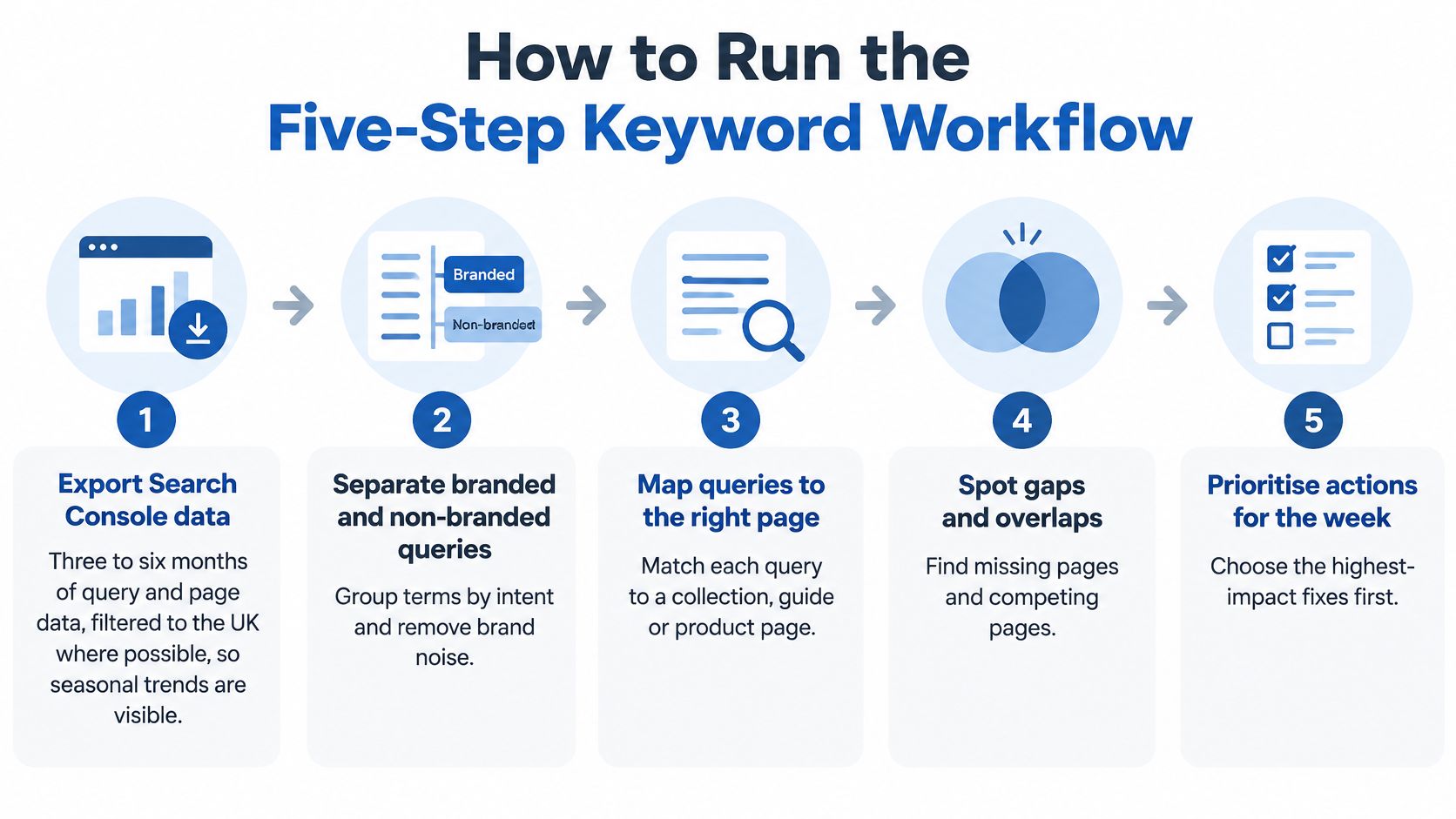
You can finish this in a week if you stay inside Search Console and the live UK results. Don't start from a volume export and hope the page type becomes obvious later.
Search still leads product discovery in Britain, and behaviour is splitting across channels. Figment Agency's UK SEO statistics note that 75% of UK adults report using search engines daily, compared with 43% who use social media and 34% who use video-sharing platforms for daily search. Build the set around British buying language, then check each cluster against impressions, clicks and conversions on the landing page.
The five steps
- Export three to six months of query and page data. Filter to the UK where the property allows it. A shorter window hides seasonal bedding spikes and regional wording, so you end up prioritising a January blip.
- Group variants by meaning, not by exact string. "Duvet cover king", "king size duvet covers" and "super king cover" are one cluster if the SERP and the product are the same. Exact-match splits create duplicate URLs that fight each other.
- Classify intent from the live UK results. If the page is mostly products, the cluster is commercial. If it's mostly explainers, don't force a collection. The current results tell you what Google is already rewarding for that meaning.
- Score each cluster as impressions × commercial relevance × ranking feasibility. Score relevance from 1 to 3 using margin and how deep the stock is. Feasibility is the gap to page one, not a vanity difficulty number from a third-party tool.
- Where two URLs rank for the same cluster, merge or redirect the weaker one, or give each a distinct intent. Leaving both live splits clicks and makes the template look inconsistent.
A scoring example
Take a cluster with 4,000 monthly impressions, relevance 3 and an average position of 9. Set that beside a 20,000-impression informational term that doesn't match a product you can fulfil. The smaller cluster wins. Moving it a few places is cheaper, and the clicks can land on a page that sells. The larger term can wait for a guide that links into the range.
Work the highest-scoring commercial cluster first. One clean URL, one intent, then the next cluster. That order beats spreading a week of copy edits across twenty half-matched pages.
Deciding Between Collection, Guide and Filter Pages
Broad terms such as "linen bedding" or "summer duvets" are merchandising decisions, not keyword trophies. Google's UK search-trend data says more than 60% of Shopping and Apparel searches show broad intent, meaning people are exploring products and styles rather than naming a precise purchase. A new collection for every variant of that exploration produces thin, near-duplicate URLs. Faceted navigation on Shopify makes that worse, because colour, size and fabric can each spawn an indexable state.
The page a shopper should meet depends on how specific the browse is.
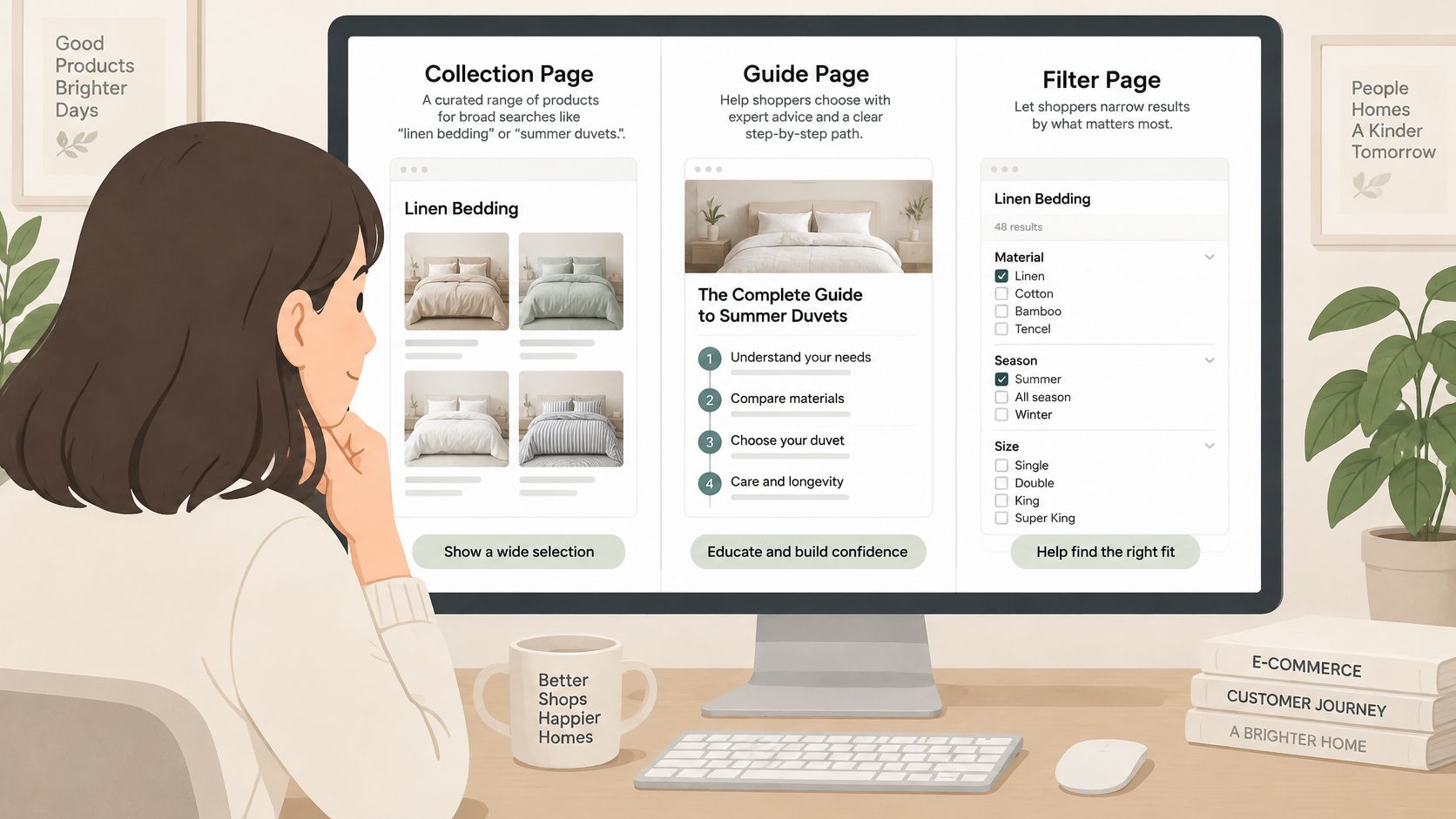
| Query pattern | Page format | Confirming signal |
|---|---|---|
| Broad style term, such as linen bedding, with many products | Collection page, with only core filter states indexed | Search Console impressions and internal search refinements |
| Exploratory question, such as what tog duvet for summer | Buying guide linked to matching collections | Clicks and onsite search follow-ups |
| Filter combination with near-zero demand | Canonical to parent collection | Zero-result searches and few impressions |
When a collection earns the URL
A collection earns an indexable URL when two things are true. You have enough products to fill the grid without padding, and Search Console shows real impressions for that wording. If either fails, the phrase becomes supporting copy on a stronger page. Colour-plus-size-plus-fabric filters should canonicalise to the parent collection unless that exact combination has its own demand.
Say the store has three products that could sit under "grey linen duvet covers". Don't launch a collection. Fold the colour into the linen duvet covers collection and expose grey as a filter. Three products won't satisfy a broad browse, and a separate URL will compete with the parent.
A high-volume phrase can be the wrong target. A 90-search query with a hard constraint, such as "king linen duvet cover 250gsm", can be worth more than a 9,000-search browse term. The constrained query maps to stock, margin and a page you can fill. The broad term mostly proves that people like linen.
Index the demand you can merchandise. Keep the rest as filters and internal links.
Over the next 60 days, check three things for any new format. Impressions for the term, internal search refinements, and zero-result searches. If refinements pile onto a filter you canonicalised, that combination may deserve its own URL later. If impressions stay flat, don't add another collection to "cover" the keyword.
This short walkthrough shows how those three page types look side by side when you're choosing what to index.
Mining Customer Questions for Product Pages
Head terms tell you which page to build. The questions people ask after they've nearly bought tell you what that page must state. Pull them from four places: customer-service tickets, onsite search, product reviews, and post-purchase emails. Those lines are already in the customer's words, including fit, wash temperature, delivery timing and returns limits.
DHL's 2025 UK ecommerce research reports that 60% of UK shoppers want retailers to provide AI-powered shopping features, including shopping assistants, virtual try-ons and voice-enabled product search. An assistant can only recommend what your page states plainly. A vague "premium linen" line doesn't answer "will it fit a 1.8 m bed" or "is it machine washable at 60°C".
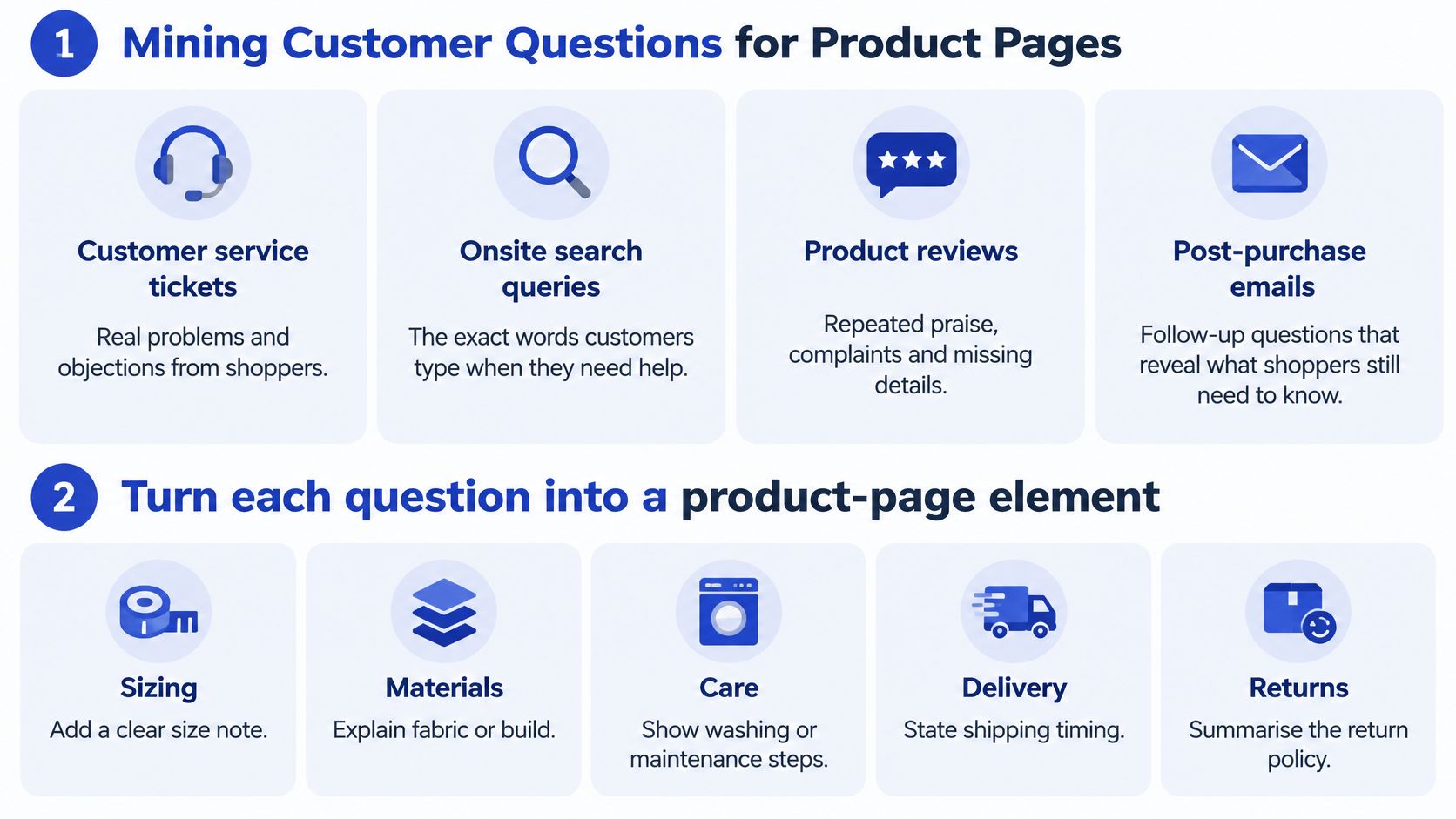
Turn each question into a short, checkable element.
- Fit: "Will it fit a 1.8 m bed?" becomes a size line in the spec table, not a paragraph of lifestyle copy.
- Care: "Is it machine washable at 60°C?" becomes a care line with the temperature you can stand behind.
- Delivery and returns: state the window in the same words on the product page, the FAQ and the policy.
Variant weights, delivery times and returns windows must match across the title, description, FAQ and structured data. If the product page says delivery in 2 to 3 days and checkout says 5 to 7, fix the source of truth before you edit copy. Contradictions confuse shoppers, and they give an assistant two answers to the same question.
Adding the head term into another heading doesn't resolve any of this. Conversational shoppers ask about compatibility, fit, returns and delivery. Mine five questions this month, one from each of tickets, onsite search, reviews and post-purchase mail, plus one you keep hearing on the phone. Put the answer on the product page as a fact, not as another keyword.
Writing Titles, URLs and Meta Descriptions From Keywords
Write each element in the order a shopper meets it. If a line can't name the question that query asks, rewrite it before you publish.
| Element | Rule | Example |
|---|---|---|
| Title tag | Primary keyword near the front, under 60 characters | Linen Duvet Covers for Super King Beds, UK Delivery |
| Meta description | 120 to 160 characters with a reason to click | Stonewashed linen covers in 6 colours, delivered in 2 to 3 working days |
| URL slug | Short, lowercase, hyphenated, stable | /collections/linen-duvet-covers |
| H1 | One per page, matches primary intent | Linen Duvet Covers for Super King Beds |
| Product description | Answers two or three secondary questions from customer mining | 200gsm stonewashed linen, machine wash at 40°C, fits a super king 180 × 200 cm bed |
What the shopper sees first
The title tag should put the primary keyword near the front, stay under 60 characters, and end on a differentiator such as UK delivery. "Linen Duvet Covers for Super King Beds, UK Delivery" does that without stuffing a second phrase in.
The URL slug stays short, lowercase and stable, with one phrase, as in /collections/linen-duvet-covers. Change a slug only when the handle is wrong or broken. When we change URLs in a migration, we set 301 redirects and keep Google Analytics tracking running without interruption, so the old path and the reporting don't die on launch day.
The H1 is one per page and matches the primary intent. It can sit close to the title. It shouldn't be a word-for-word duplicate with extra modifiers bolted on. Headings and subheadings then carry the secondary questions, such as tog, care and fit, rather than repeating the same phrase.
The lines that earn the click and the order
The meta description runs about 120 to 160 characters and gives a reason to click: fabric weight, a delivery window, or the returns position. Don't reuse one description across the collection template. A shared sentence tells the shopper nothing about this URL.
The product description answers two or three secondary questions from the mining work. Fill weight, care and fit are enough. Don't walk the primary keyword through every heading.
Image alt text describes the product in shopper wording, such as "linen duvet cover in grey for a super king bed". Internal link anchors name the destination, "linen duvet covers", not "click here". Stuffing the same phrase into every element reads as a template, and it doesn't answer a new question.
Measuring Whether Each Page Earns Its Keywords
Pair each cluster with its target URL and read the same metrics every month. Search Console covers impressions, average position and click-through rate. GA4 e-commerce reporting covers orders or assisted orders on that landing page. Shopify search reports, or your search app, cover zero-result queries. The pattern matters more than any single spike.
| Metric | Where to find it | What it tells you |
|---|---|---|
| Impressions per URL | Search Console performance report | Demand reaching the page for the cluster |
| Average position | Search Console performance report | Ranking feasibility for the target query |
| Click-through rate | Search Console performance report | Whether the title and meta description earn the click |
| Orders or assisted orders | GA4 e-commerce reports | Whether the page converts the intent it targets |
| Zero-result onsite searches | Shopify search reports or search app | Gaps in the keyword set and missing product facts |
How to read what you see
High impressions and a weak click-through rate usually mean the title or meta description isn't the offer the query implies. Rewrite those two lines before you add body copy.
Positions 8 to 15 with strong impressions usually need more depth on the page, or internal links from related collections and guides. Chasing a new keyword while this one sits just off page one wastes the demand you already have.
A healthy click-through rate and weak orders means the page answers a different intent from the query. A guide ranking for a buy-phrase is the classic case. Change the format or retarget the URL. Don't keep polishing the introduction.
I would wait 60 to 90 days before editing the same page again, so a seasonal swing or a slow recrawl doesn't trigger a second rewrite.
On a new page, check impressions first. If the URL isn't being shown for the cluster, title tweaks won't create demand that isn't reaching it.
Confirm the Keyword Map Before Your Next Release
Take the three highest-scoring clusters from the workflow and check each one against the intent table before you change any copy.
For each cluster, confirm the target URL matches its intent. Decide whether it needs a broad collection, a product page or a guide, using inventory depth and real impressions rather than the biggest number in the export. Then rewrite the title, meta description and H1 for those three URLs. Add two FAQs drawn from tickets, reviews or post-purchase mail. Merge or redirect any second URL that ranks for the same cluster.
Record the baseline before release: impressions, average position, click-through rate and orders for each URL, from Search Console and GA4. Set the review for 90 days out. Earlier edits mostly react to crawl delay and seasonality. If scoring surfaces more clusters than the team can ship, rank the rest and run the same order next quarter. Internal linking from the new or merged URLs should point at the page that now owns the intent, with anchors a shopper would recognise. A dedicated squad of a senior developer, a UX designer and a CRO specialist can ship the redirects, the template copy and the measurement in one release instead of three disconnected tickets.
On-page keyword research only pays off when the URL, the merchandising and the product facts agree. Grumspot builds and fixes Shopify and Shopify Plus stores with that kind of release in mind, from collection architecture to the measurement that shows whether a page earned its queries. If you want a clear plan for the three clusters you'd ship next, book a free discovery call and talk it through with Grumspot.
Want this kind of work on your store?
Send us the URL and what is slowing it down. We look at the store before we reply.
Related posts
Check out some similar posts.
- how to improve site seo
Learn how to improve site SEO in the right order: fix crawling, speed, product data and measurement ...
Read more
- ecommerce on page SEO
On page SEO for ecommerce on Shopify, step by step: product and category pages, metadata, structured...
Read more
- on page SEO
On Page SEO Services explained: the deliverables, Shopify process, template speed and accessibility ...
Read more
- seo technical audit checklist
Use this SEO technical audit checklist to find and fix 10 ecommerce issues across crawling, speed, i...
Read more