Ultimate Internal Linking Strategy: Boost Rankings 2026
- internal linking strategy
- ecommerce SEO
- site architecture
- anchor text
- Shopify SEO
66.2% of web pages have only one internal link pointing to them, according to a UK SEO publication citing Ahrefs (Clickslice). That isn't a minor housekeeping issue. On a Shopify store, it can leave a profitable collection, a newly launched product, or a buying guide buried beneath a structure that makes sense only to the merchandising team that built it.
An effective internal linking strategy gives every important page a deliberate role. Navigation, breadcrumbs, collection templates, product recommendations, editorial links, and supporting guides should work together to direct shoppers and search engines towards the pages that matter commercially. Randomly adding links to blog posts won't fix a weak architecture.
This guide focuses on the operational side of internal linking at scale, particularly in Shopify and other CMS environments. It covers auditing, hub-and-spoke structures, anchor text, template implementation, measurement, and the mistakes that cause teams to spend weeks adding links without improving discovery, rankings, or assisted conversions.
Why Most Internal Linking Efforts Fail
The most damaging internal linking problem often stays hidden during daily trading. Products remain available, collections continue generating revenue, and the CMS shows no obvious error. Meanwhile, commercially important URLs receive little support from the rest of the site. Shoppers and crawlers reach them through long, indirect paths, or fail to reach them at all.
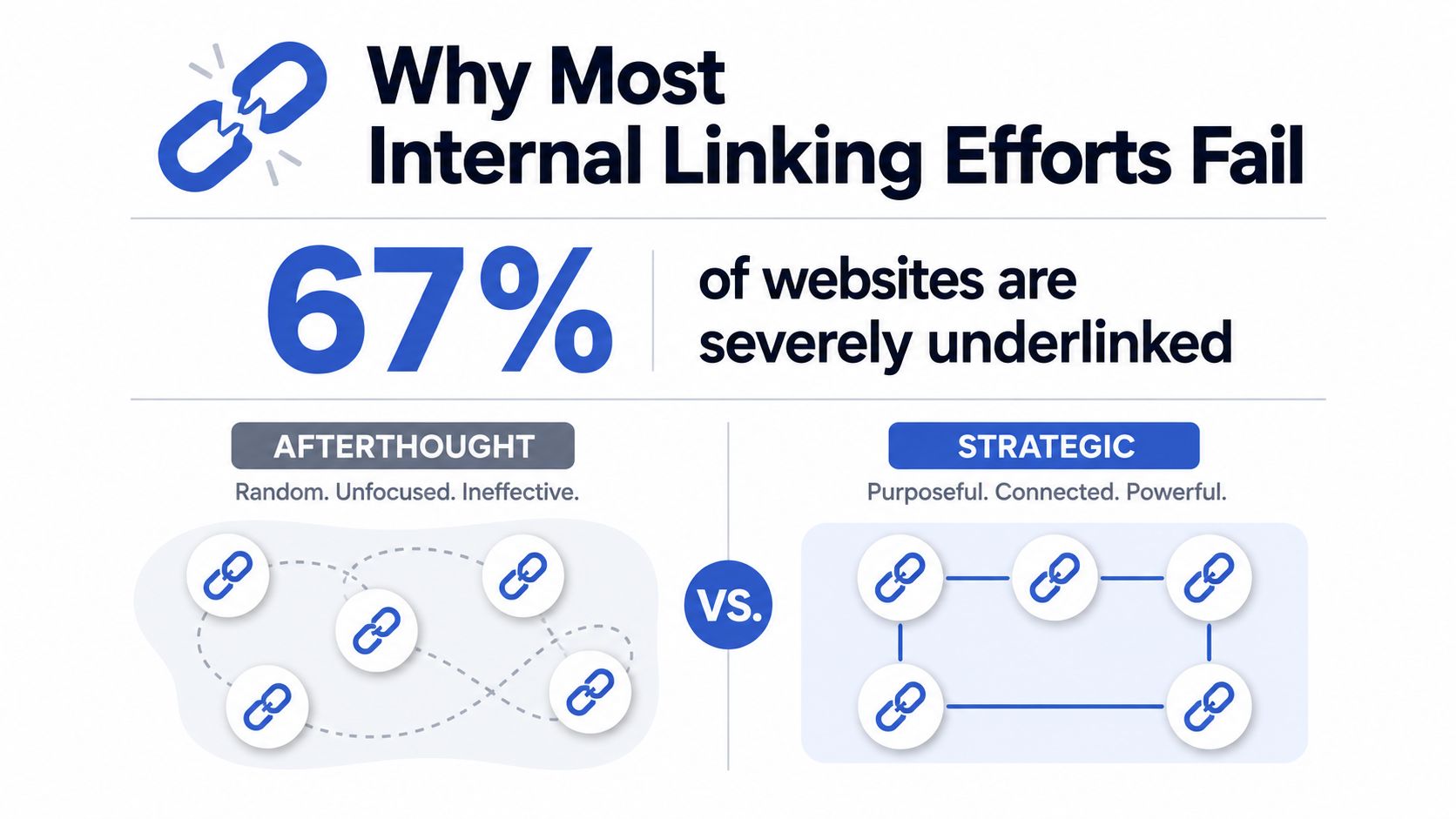
The structural weakness is measurable. A UK publication citing Ahrefs reported that 66.2% of web pages have only one internal link pointing to them (Clickslice's ecommerce internal linking guide). Another UK SEO guide reports that 25% of web pages have zero internal links and 42% of websites have broken internal links (White Hat SEO's internal linking guide). Orphan pages therefore represent a commercial problem as well as a crawl issue. A page with no natural route from relevant parts of the store has fewer opportunities to attract organic visits, support product comparison, or assist a purchase.
Random links aren't a strategy
Ad hoc linking follows a predictable pattern. An editor publishes an article and adds links they happen to remember. A developer places a related-products block in a template. A merchandiser updates a collection, removes an item, and leaves links pointing to a redirect or missing page.
Each task can appear reasonable on its own. The store still lacks a shared system for deciding which pages deserve internal authority, which supporting pages belong to each commercial hub, and what should happen when the catalogue changes.
A workable strategy defines four operating decisions:
- Priority: Which collections, products, landing pages, or guides matter most for revenue and organic visibility?
- Relationship: Which pages support those destinations, and what would a shopper reasonably expect to find next?
- Placement: Should the link appear in navigation, body copy, a product module, a breadcrumb, or a related-content component?
- Maintenance: What happens when a product is discontinued, a collection changes, or a URL is migrated?
Practical rule: Every internal link needs a user reason and an architectural reason. If neither is clear, remove it.
Template-based insertion makes this discipline possible at scale, provided the rules are specific. A Shopify collection template can surface links to its parent category, relevant buying guides, and selected subcollections. Product templates can connect items to their collection, compatibility content, and related products. Hard-coded additions still need review because automation can create irrelevant links across thousands of URLs.
The architecture must reflect business priorities
A large Shopify catalogue can produce thousands of possible connections. Linking every page to every other page creates visual clutter, weakens topical clarity, and makes priority destinations harder to identify. Hub-and-spoke silos give category pages a defined role while keeping supporting content connected to the products it helps shoppers evaluate.
The UK-focused guidance from Delivered Social's internal linking guide recommends identifying 10 to 30 priority pages, supporting each with 5 to 20 relevant pages, and adding at least 2 to 5 internal links from relevant existing pages to every new page before publishing. These ranges should guide an operating process, not trigger mechanical link insertion. Teams can use the same framework when planning collection templates, editorial hubs, and launch checklists.
Competitor visibility provides useful context during testing. Teams may compare how rankings track competitors with MyMentions while monitoring structural SEO work. Ranking movement should be assessed alongside organic clicks, indexed pages, assisted conversions, and crawl access, since any single fluctuation can have another cause.
Auditing Your Current Link Architecture
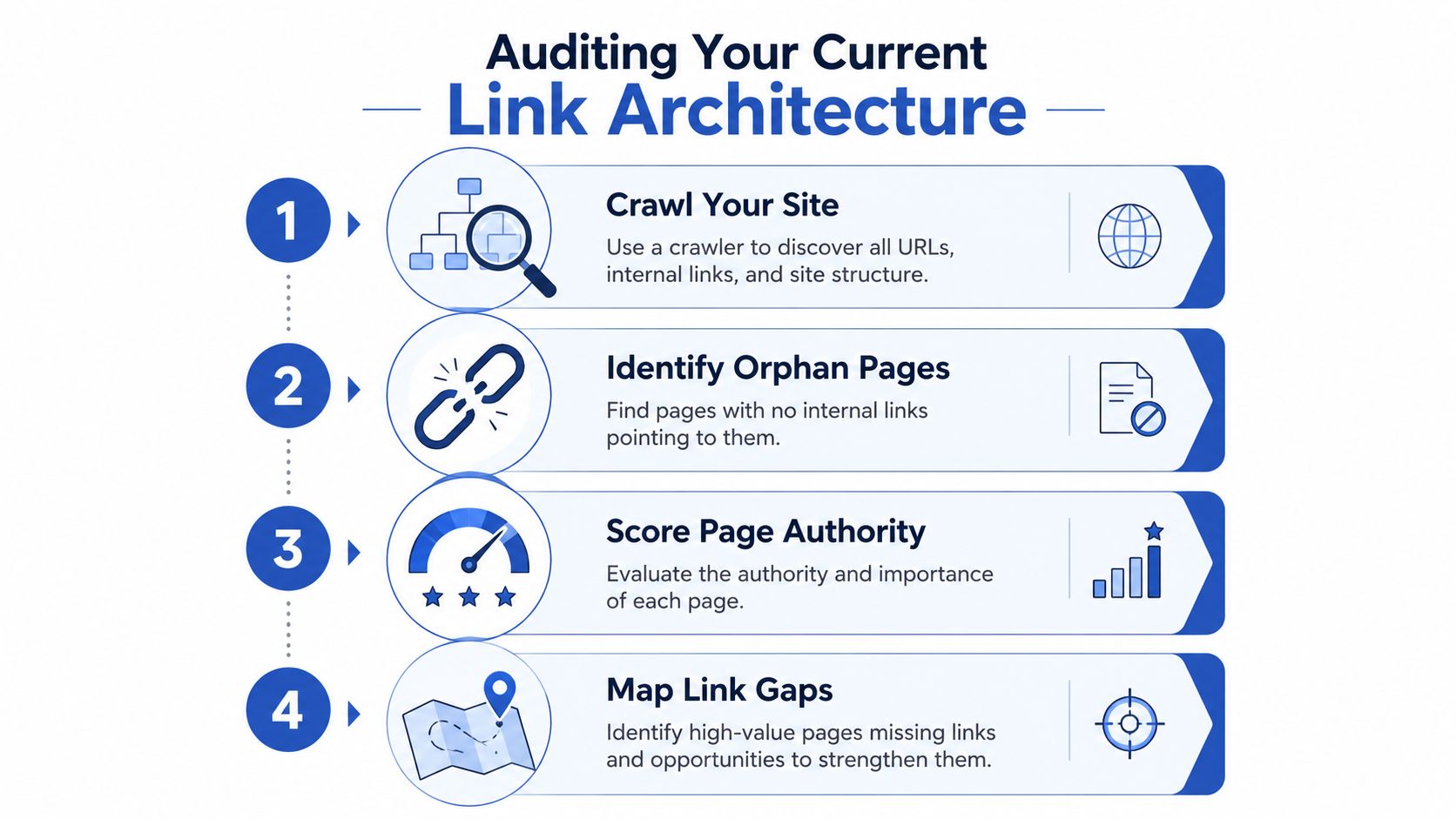
Adding links before understanding the existing structure creates duplication, bloated navigation, and wasted development time. Start with a crawl, then combine technical findings with commercial priorities and Shopify implementation constraints.
Crawl the site and reconcile the URL set
Use Screaming Frog or Sitebulb to crawl the live storefront. Export every indexable URL with crawl depth, unique incoming internal links, outgoing internal links, status code, canonical target, page type, and indexability signals. In Shopify, separate products, collections, blogs, articles, pages, search URLs, filtered URLs, and system-generated paths before interpreting the results. These URL types behave differently and often need different link rules.
A crawl will not reveal every orphan page. Compare its output with the XML sitemap, Shopify product and collection exports, and landing-page data from analytics or Search Console. A URL listed in the sitemap or receiving organic impressions but lacking incoming links in the crawl needs review. Check the XML sitemap best practices before treating sitemap coverage as proof that the page is properly connected.
Turn crawl data into a priority list
Do not sort the export only by link count. A discontinued product with little demand does not deserve the same work as a profitable collection with strong search potential and weak internal support.
Build a practical score from fields such as:
- Commercial value: Revenue, margin, conversion intent, or strategic importance.
- Organic opportunity: Existing impressions, rankings close to the first page, or relevant search demand.
- Structural weakness: Crawl depth, unique inlinks, orphan status, and support from relevant hubs.
- Content role: Category hub, subcategory, product, buying guide, comparison page, or support content.
- Operational status: Live, seasonal, discontinued, redirected, or awaiting merchandising review.
The scoring model can stay simple. Its job is to keep the team from spending a sprint adding easy links that do not improve discovery, shopping paths, or authority distribution.
Look for buried pages and bad links
Review pages with low unique inlinks and high business value first. Check whether important collections sit behind a broad menu but lack contextual links from guides, related categories, and relevant product pages. Inspect new products separately. They may be reachable only through a heavily paginated collection grid or a recommendation module whose links change dynamically.
Then isolate quality problems:
- Orphan pages: Decide whether to link, consolidate, redirect, or remove them.
- Broken internal links: Replace missing destinations with the correct live URL.
- Internal redirects: Update source links so they point directly to the final URL.
- Irrelevant links: Remove generic-module links that do not help shoppers.
- Overlooked high-authority pages: Review older guides and campaigns with external links, then assess whether they can support a relevant commercial destination.
Finish with an owned, page-level action list. Assign each recommendation to content, merchandising, development, or SEO. Record the intended destination, anchor text, template or source page, implementation method, and validation date. For template-based changes, test the rule on a sample of product and collection URLs before deploying it across the store. After release, compare unique inlinks, crawl depth, indexed coverage, organic clicks, and assisted conversions against the audited baseline.
Building Hub and Spoke Silos for Ecommerce
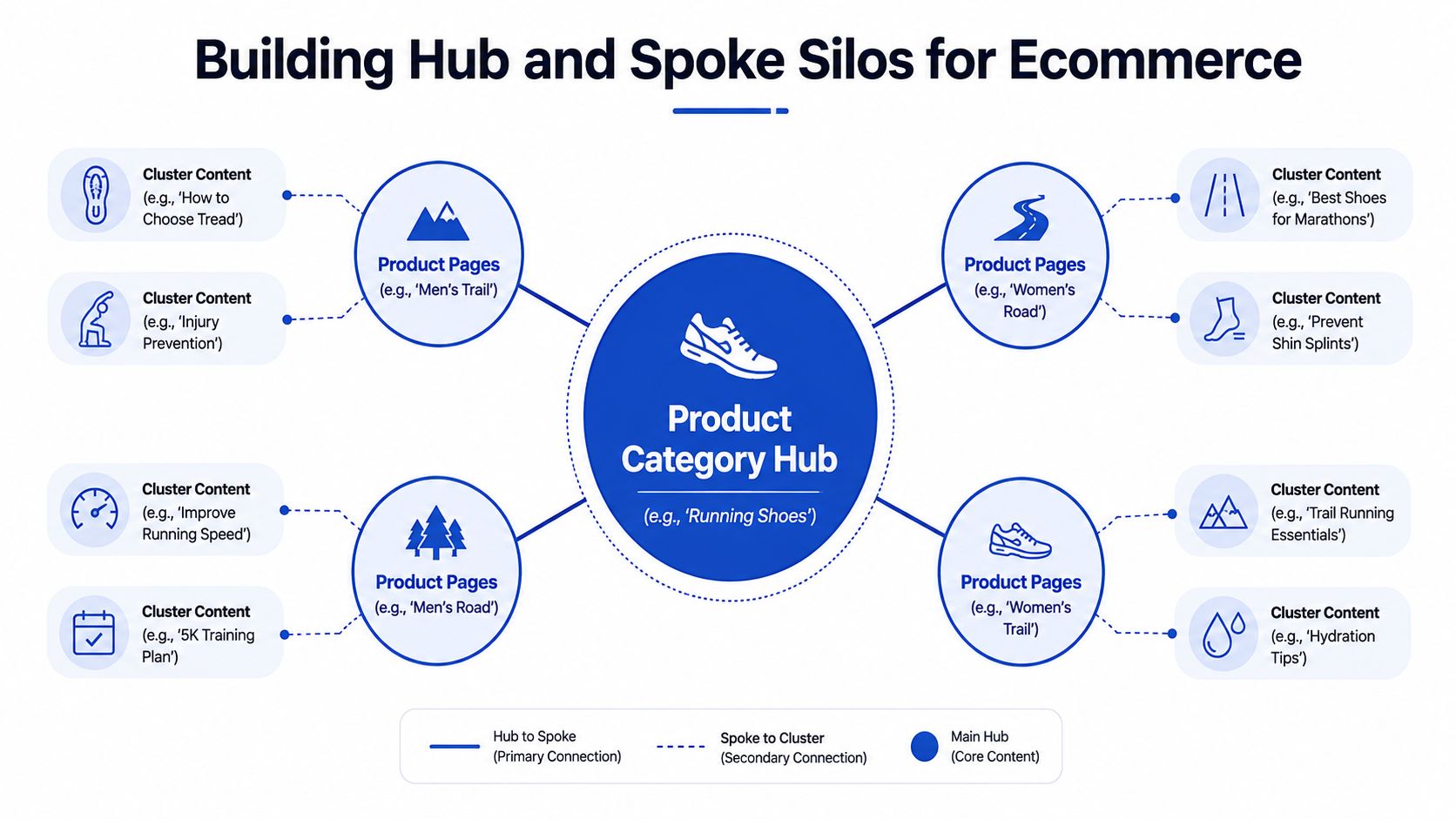
A Shopify store needs a hierarchy that follows shopping intent. The category hub introduces a product family, then directs shoppers to meaningful subcategories. Product pages should make the next sensible choice clear. Editorial content answers questions before purchase and sends readers to the commercial hub that fits those questions.
Use a defined group of priority pages and build supporting content around each one. The right scale depends on catalogue size, category depth, and available editorial resources. Treat the model as a planning framework, then adjust it after reviewing crawl paths, merchandising goals, and conversion data.
Start with the commercial hub
Take a running-shoe store. “Running shoes” can serve as the broad hub, with spokes for men's trail running shoes, women's road running shoes, stability shoes, and lightweight racing shoes. Each spoke needs a distinct purpose, its own merchandising, and links that help shoppers move between broad and specific choices.
Build that hierarchy into the templates and content:
- Collection introduction: Link to useful subcategories through descriptive copy rather than a keyword list.
- Breadcrumbs: Show the relationship between the product, subcategory, and broader category. Shopify teams can review this breadcrumb navigation guidance when setting a path that works for shoppers and crawlers.
- Product modules: Link to relevant alternatives, accessories, or related products only when the relationship is genuine.
- Buying guides: Send readers to the category or subcategory that answers the question they are researching.
- Collection links: Link back to the parent hub when it improves orientation. Do not force every cross-category relationship.
Template rules matter at scale. A collection template can add links to selected child collections, while a product template can expose its parent collection and carefully chosen alternatives. Keep these rules controlled. A broad related-products block that appears on every URL can create hundreds of weak connections and obscure the links that carry real shopping value.
Connect content to buying intent
A guide titled “How to choose running-shoe tread” should link to trail and road collections where that distinction affects the purchase. An injury-prevention guide can point to stability footwear when the copy explains why that product type may help. The anchor should describe the destination and set a clear expectation instead of saying “shop now”.
Cross-links between adjacent categories can help shoppers compare options, such as trail and road footwear. Relevance sets the boundary. A category page does not need links to every blog article, and an article should not point to unrelated products just because they have a higher margin.
For stores with complex navigation, an audit that drives more calls can show whether informational pages support commercial journeys. The review should connect link placement with measurable outcomes, rather than treating each internal link as an isolated technical task.
Use this allocation model:
| Page type | Primary linking role | Typical destinations |
|---|---|---|
| Main category | Establish the product family | Subcategories, priority guides |
| Subcategory | Refine intent | Products, parent category, relevant guides |
| Product page | Support selection | Parent collection, alternatives, accessories |
| Buying guide | Answer a question | Relevant collections, subcategories, supporting guides |
| Editorial article | Build topical context | Hub page, specific products where appropriate |
A short explainer can help merchandising, content, and development teams understand the relationship between a category hub and its supporting pages:
The strongest silo gives shoppers a clear route from question to category, category to product, and product to a relevant alternative. Review click paths, collection engagement, organic landing-page performance, and assisted conversions after template changes. If the added links receive no interaction and support no commercial journey, revise the rule rather than expanding it across the store.
Anchor Text Strategy and Scalable Implementation
Anchor text is a small implementation choice with a direct effect on usability and topical clarity. “Read more” gives shoppers little direction. “Women's road running shoes” identifies the destination, fits the buying decision, and gives search engines useful context.
Choose the wording according to the destination:
- Exact match: Link “women's road running shoes” to the matching collection when the phrase is natural and accurate.
- Partial match: Use “road shoes for wet-weather training” when the sentence needs a broader or more descriptive phrase.
- Contextual description: Write “compare lightweight options for long-distance training” when linking to a comparison or collection page.
Descriptive anchors usually provide more value than generic labels, but repeating one phrase across a large site creates its own problem. The practical standard is specificity with variation. Every anchor should describe the destination, reflect the surrounding sentence, and match the page's actual intent. Avoid forcing a commercial keyword into copy where shoppers would use different language.
Implement links where the CMS can maintain them
In Shopify, separate links that support the customer experience from links added only for search visibility. Put stable structural links in Liquid sections or snippets, including collection navigation and breadcrumbs. Use product recommendation blocks only when their rules produce relevant alternatives. Keep editorial links in rich-text content or blog templates so an editor can review the sentence around each link.
Large catalogues should not hard-code product URLs across hundreds of templates. Use collection handles, product objects, metafields, or metaobjects to manage relationships centrally. A curated “related collection” metafield lets merchandising select the destination without a developer changing theme code.
The same operating model works in other CMS platforms:
- Reusable modules: Build related-category or supporting-guide components with fields for destination, label, and display rules.
- Programmatic insertion: Apply content rules only when a relevant term appears and the target has been approved.
- Migration controls: Keep a URL map and update internal references during migrations instead of depending on redirects.
- Editorial governance: Give writers approved destinations and anchor guidance, then require human review before publication.
Automation saves time across large stores, but broad matching can generate poor links at scale. A rule that links every mention of “shoes” to one collection creates repetition, weak relevance, and awkward copy. Set exclusions, limit the number of links each module can output, and test the rule on representative product, collection, and editorial templates before a global release.
Implementation principle: Automate repetitive mechanics, not the judgement required to assess relevance.
Measuring Impact and Refining Your Approach
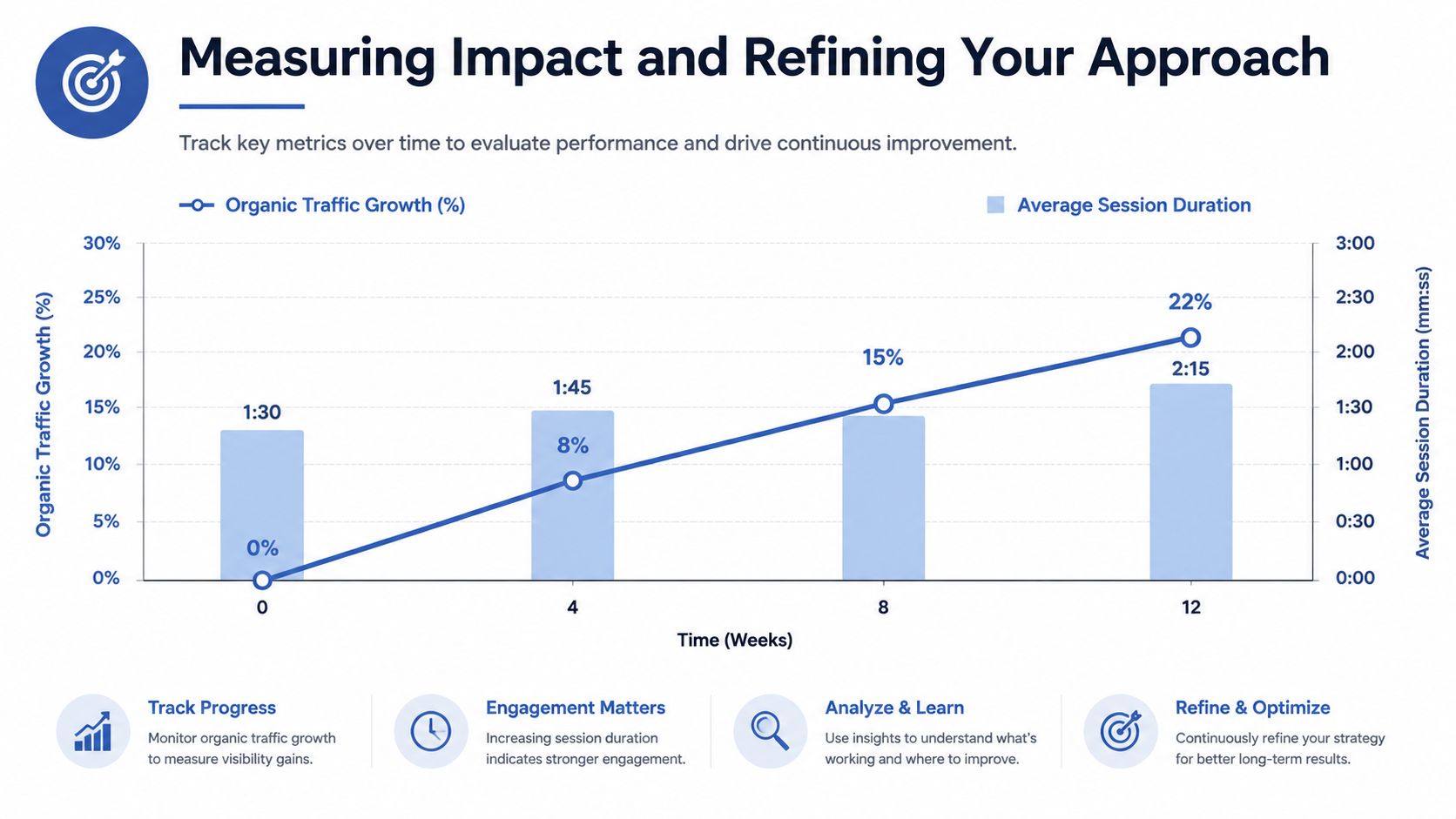
A linking change needs an evidence trail before it deserves a permanent place in the Shopify theme. A ranking movement alone cannot prove causation when content updates, technical SEO work, seasonality, or external links changed during the same period.
Before deployment, record the affected URLs and select a comparable group of pages that will not receive the change. Log the release date, source templates, destination URLs, anchor text, and related content or merchandising updates. In Shopify, include the collection, product, and editorial templates involved. This record lets the SEO team interpret results from documented changes rather than memory.
The KPIs that matter
| KPI | What it tells you | Useful tools |
|---|---|---|
| Unique inlinks | Whether priority pages receive meaningful support | Screaming Frog, Sitebulb |
| Crawl depth | Whether important URLs remain buried | Screaming Frog, Sitebulb |
| Indexation status | Whether linked pages are discovered and retained | Google Search Console |
| Impressions and rankings | Whether visibility changes after support improves | Google Search Console, rank tracking |
| Organic entrances | Whether users reach the target pages from search | GA4 |
| Assisted conversions | Whether links contribute to buying journeys | GA4, Shopify analytics |
| Broken and redirected links | Whether the architecture is degrading | Crawlers, Search Console |
The UK guide from DigiVisi reports that pages with 40-44 internal links can receive 4x more traffic than pages with fewer links (DigiVisi's internal linking best practices). Treat that finding as a prompt for investigation, not a quota for every URL. Link counts depend on page purpose, template, content length, and user need. A product page with a focused group of relevant links may perform better than a guide crowded with navigation and related-content modules.
Refine by pattern, not isolated wins
Review results by page type and silo. If collection pages become easier to crawl while product pages still have weak inlinks, adjust product and related-collection modules. If impressions rise without useful entrances, examine anchor context, search intent, and the linking source's relevance.
Separate technical outcomes from commercial outcomes. Discovery and indexation show whether the architecture is functioning. Rankings and organic entrances show whether visibility may be responding. Assisted conversions, product views, add-to-basket actions, and revenue from users who followed internal links indicate whether the change supports the buying journey.
Use statistical significance testing for experiments or segmented performance comparisons. Internal linking releases rarely behave like controlled laboratory tests, especially during seasonal trading periods. A documented rollout, a clean comparison set, repeated crawls, and template-level reporting usually provide the clearest basis for action. Remove modules that add clutter without improving discovery or customer movement.
Common Pitfalls and How to Avoid Them
Internal linking fails when teams optimise link volume instead of the quality of the path. A sitewide block can raise link counts while obscuring the relationships that matter. Shoppers need a relevant next step, not every possible destination.
Avoid quantity without purpose
Internal link density has no universal ceiling. A broad collection page and a short product description need different levels of supporting navigation. Review placement, relevance, and user value together before approving another link module.
At scale, Shopify themes and CMS templates can repeat the same destination in the header, footer, sidebar, product description, and related-content block. Audit rendered templates, then remove duplicate placements where they add no new context.
Watch for these failure modes:
- Template duplication: Several components point to the same destination, weakening priority and adding clutter.
- Anchor over-optimisation: Every source uses identical commercial wording, making copy unnatural and removing useful contextual variation.
- Broken accumulation: Discontinued products and renamed collections leave dead links across articles, menus, and custom sections.
- Navigation bloat: Mega menus expose every filter, tag, and minor collection, flattening the architecture and hiding category priorities.
- Blind automation: A script inserts links from keyword matches without checking whether the destination answers the sentence.
- Faceted URL sprawl: Filter combinations become crawlable internal destinations despite offering little standalone value.
Fix the source, not just the symptom
For a discontinued product, choose the destination deliberately. A replacement product, parent collection, buying guide, or no link may be appropriate. Update the source pages, including CMS content and reusable theme sections, then recrawl the site to confirm that obsolete references are gone.
If a module creates excess links, narrow its scope. Show closely related products or collections, apply merchandising rules, and remove related-content blocks from pages where they interrupt the buying decision. Check JavaScript behaviour as well. A link revealed only after interaction may provide less crawl and usability value than a standard HTML link.
A/B testing is useful when a linking change affects the interface, such as recommendation blocks or collection navigation. Follow disciplined A/B testing best practices, and track commercial behaviour alongside SEO risk. A short-term metric movement should not remove a useful navigation path, while higher link counts do not justify a visually intrusive module.
The strongest correction is selective. Keep links that clarify hierarchy or support a decision, replace obsolete destinations, and remove links that exist only because a template made them easy to add. Record the rule in the CMS so the same mistake does not return during the next theme release.
Grumspot helps Shopify teams audit connections between guides, collections, products, and buying journeys, including theme-based implementation and Shopify 2.0 migrations. Visit Grumspot to discuss an internal linking audit or a storefront project that turns planned architecture into maintainable CMS components.
Want this kind of work on your store?
Send us the URL and what is slowing it down. We look at the store before we reply.
Related posts
Check out some similar posts.

- how to improve site seo
Learn how to improve site SEO in the right order: fix crawling, speed, product data and measurement ...
Read more
- ecommerce on page SEO
On page SEO for ecommerce on Shopify, step by step: product and category pages, metadata, structured...
Read more
- on page SEO
On Page SEO Services explained: the deliverables, Shopify process, template speed and accessibility ...
Read more
- what is seo audit
What is SEO audit? Learn how technical, on-page and content checks uncover issues hurting your Shopi...
Read more