Technical SEO Audit Service: What You Get Explained
- technical SEO audit
- SEO audit service
- Shopify SEO audit
- site speed audit
- Core Web Vitals

Only 1-2% of pages in a UK ecommerce speed study of about 150 retailers, covering 460 homepage, category and product pages, achieved a good Largest Contentful Paint. The average time for the main content to appear was 12-14 seconds, far above Google's 2.5-second good threshold, in Koozai's UK ecommerce speed index.
A crawl export will not explain that. A technical SEO audit service has to test the templates that build the store, then tie slow rendering and inaccessible markup to the organic sessions those templates earn. I would keep accessibility and real-user speed inside that scope, not on a separate checklist that nobody implements.
The UK government's Business Data Survey reports that 78% of businesses had a website in 2025-2026, up from 68% in 2023-2024. With that many stores competing, indexation and page quality are commercial controls.
What a Technical SEO Audit Service Covers
| Audit area | What the auditor checks | Typical finding | Who usually fixes it |
|---|---|---|---|
| Crawl and indexation | robots.txt, XML sitemap, crawl errors, noindex tags | Product pages blocked or missing from Google | Developer or platform team |
| On-page SEO | Title tags, meta descriptions, heading structure, URL patterns | Duplicate titles on paginated collections | Content owner |
| Structured data | Product, breadcrumb and organisation markup | Product schema missing on variants | Developer |
| Canonicals and redirects | Canonical tags, 301 chains, changed URLs | Redirect chains left after a URL change | Developer |
| Internal linking | Navigation, related products, faceted URLs | Crawl effort spent on filter pages | Developer or theme team |
| Speed and code | Scripts, app embeds, theme code, image sizes | Slow largest content element on collection pages | Developer and app owners |
| Mobile UX and checkout | Navigation, product pages, cart, checkout flow | Tap targets too small on mobile | Designer or developer |
| Accessibility | Heading order, contrast, alt text, focus states | Missing alt text on product images | Theme and content team |
The useful distinction is scope. An audit tests the template systems that generate the store, so a product-template defect is found once and traced to every product that uses it. A one-off check that samples a handful of URLs misses the same fault repeated across hundreds of products.
Our SEO health check reviews metadata, headings, URL structure, the sitemap and structured data. The UX review covers navigation, product pages, cart and checkout. Those passes belong in one engagement. A heading bug and a checkout bug often share a theme file, and splitting them into two projects doubles the release risk.
Why sampling fails on Shopify
Say pagination on a collection template reprints one title on every page. Three hand-picked product URLs will look fine. A template crawl plus the Page indexing report will not.
Faceted collection URLs are the usual crawl sink. Colour, size and price filters can mint thousands of near-duplicates. The durable fix is a canonical or noindex rule in the theme, owned by a developer, not a content edit on each filter URL.
A finding without a template name and an owner is a note, not a ticket.
Two questions before you book
- Never checked: Which rows above has a person reviewed, rather than a plugin scan that you archived?
- This week in Search Console: Use the Page indexing report for noindex tags and crawl errors, and the Core Web Vitals report for speed by template.
I would start with the template that earns the most organic sessions. A tidy homepage does not prove the product template is indexable.
How an Audit Runs from Kickoff to Report
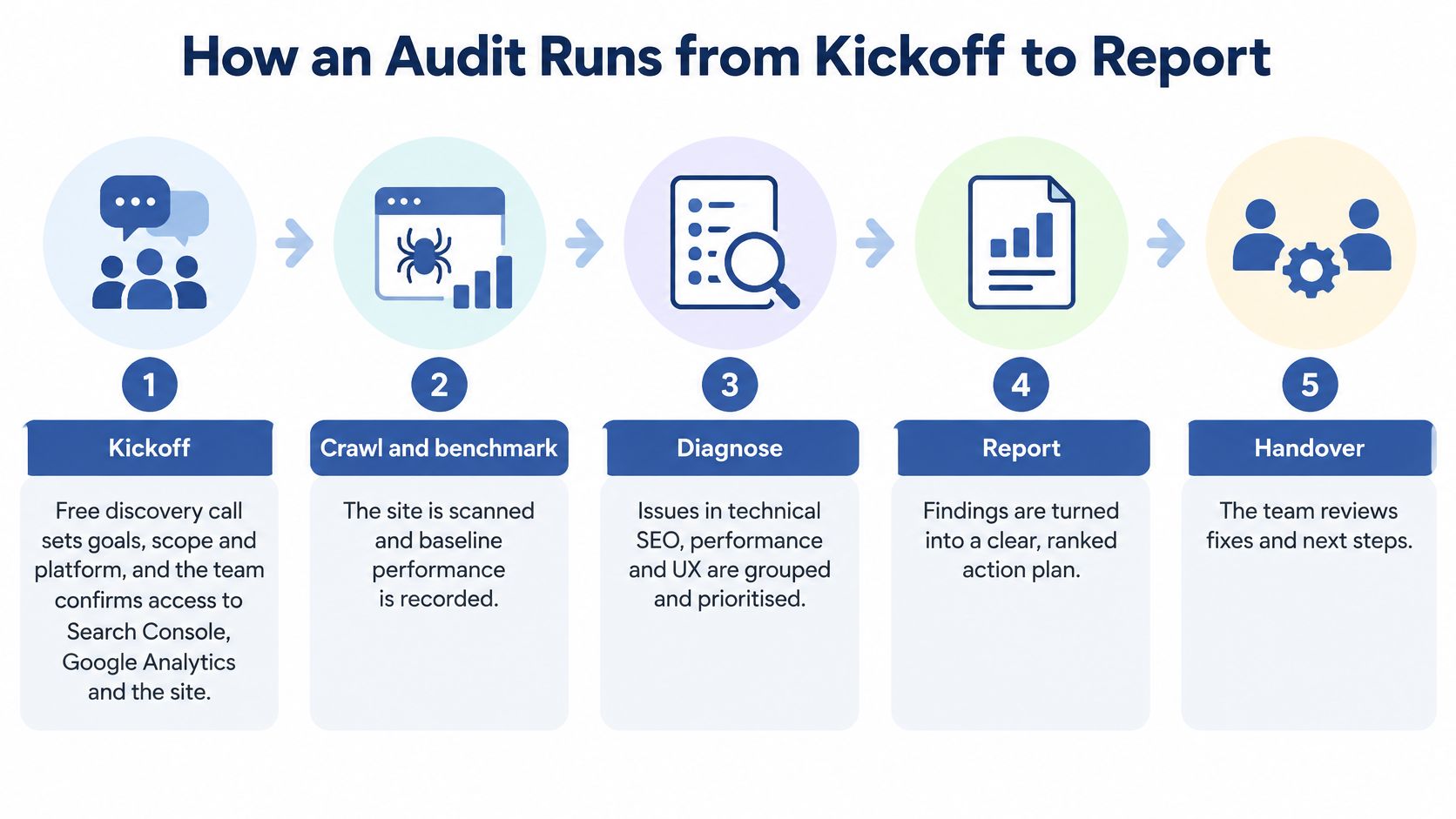
Five phases, one squad. Each engagement pairs a senior developer, a specialised UX designer and a CRO specialist, so a code defect, a layout defect and a conversion defect are judged in the same review rather than in three reports that disagree.
- Kickoff. A free discovery call sets goals, scope and platform, and we confirm access to Search Console, Google Analytics and the Shopify admin. You leave with a written scope and a list of accounts still missing.
- Crawl and sample. The store is crawled and key templates are sampled, including home, collection, product, cart and checkout. Catalogues with many variants take longer to crawl, and you receive a URL inventory grouped by template.
- Measure. Lab tests sit beside real-user Core Web Vitals, split by device and template. A fast median can hide a slow tail. Published figures on UK government digital-service performance show a median page load of 0.455 seconds, 83% of visitors at one second or less, and a slowest reported experience of 2.35 seconds, about 417% slower than the median, with 74% of measured usage on smartphones and tablets in 2021. You receive percentile splits, not one desktop score.
- Analyse. The developer, designer and CRO specialist review causes together. You receive one shared diagnosis, with theme issues separated from app issues and content issues.
- Report. Findings ship with step-by-step recommendations. We give an estimated timeline after reviewing the store, because catalogue size changes the crawl, and there is no fixed duration before that review. You receive the ranked report and that timeline.
If the brand also sells on Amazon, it is worth the time to evaluate Amazon SKU profitability in the same planning window. Marketplace margin and storefront technical debt should not be scheduled as if they were unrelated.
What to prepare
- Search Console: Owner access, not a restricted user who cannot open the indexing report.
- Analytics: Admin rights on the property that holds organic sessions.
- Theme: Access to the live theme and any unpublished theme you plan to launch.
- Landing pages: The top 20 URLs by organic sessions, with the template name next to each.
Reading the Audit Report and Fix Priorities
| Severity | What it means | Example finding | Typical timing |
|---|---|---|---|
| Critical | Blocks indexing or checkout | noindex on the live product template | Fix before the next release |
| High | Hurts rankings or conversion at scale | Slow largest content element on collection pages | Fix within the current sprint |
| Medium | Limits visibility on specific pages | Duplicate titles on paginated collections | Schedule in the next release |
| Low | Minor hygiene issue | Overlong meta descriptions on older posts | Batch with routine content updates |
The report should give each finding a location, the evidence, a recommendation and an owner. Issues are prioritised by severity and impact, not by how many rows a crawler printed.
A Shopify audit of this kind should be able to name conversion blockers, slow page loads, poor mobile experience, broken code, SEO problems, problematic apps, inefficient theme code, checkout friction and navigation problems. If a report cannot say which of those it found, it is still a scan.
How ranking actually works
Impact versus effort beats raw error counts. A critical noindex on the live product template is a one-line change and it goes first, because every product URL is out of Google. An overlong meta description on an old blog post waits, even if it is equally easy, because almost no organic sessions sit on it.
Take a store with three open items. A broken canonical on collection pages is critical when those collections are the main organic landing templates, because Google may index the wrong URL at scale. Unlabelled filter buttons are high when keyboard users cannot narrow the grid and the filtered view is also what a crawler fails to interpret. Oversized hero images are high on the collection template if that template carries a large share of organic sessions, and lower if the slow hero sits on a campaign page with little search traffic.
Fix the line that blocks indexing before you polish copy nobody ranks for.
What you do with the report
- Pick three: Take the top three critical items only. A longer list stalls engineering.
- Name an owner: Assign a developer, a theme owner or a content owner to each, with the file or template they will change.
- Set the re-test: Book a check four weeks later against the same Search Console reports and the same templates.
Core Web Vitals Targets and Where Audits Find Slowdowns
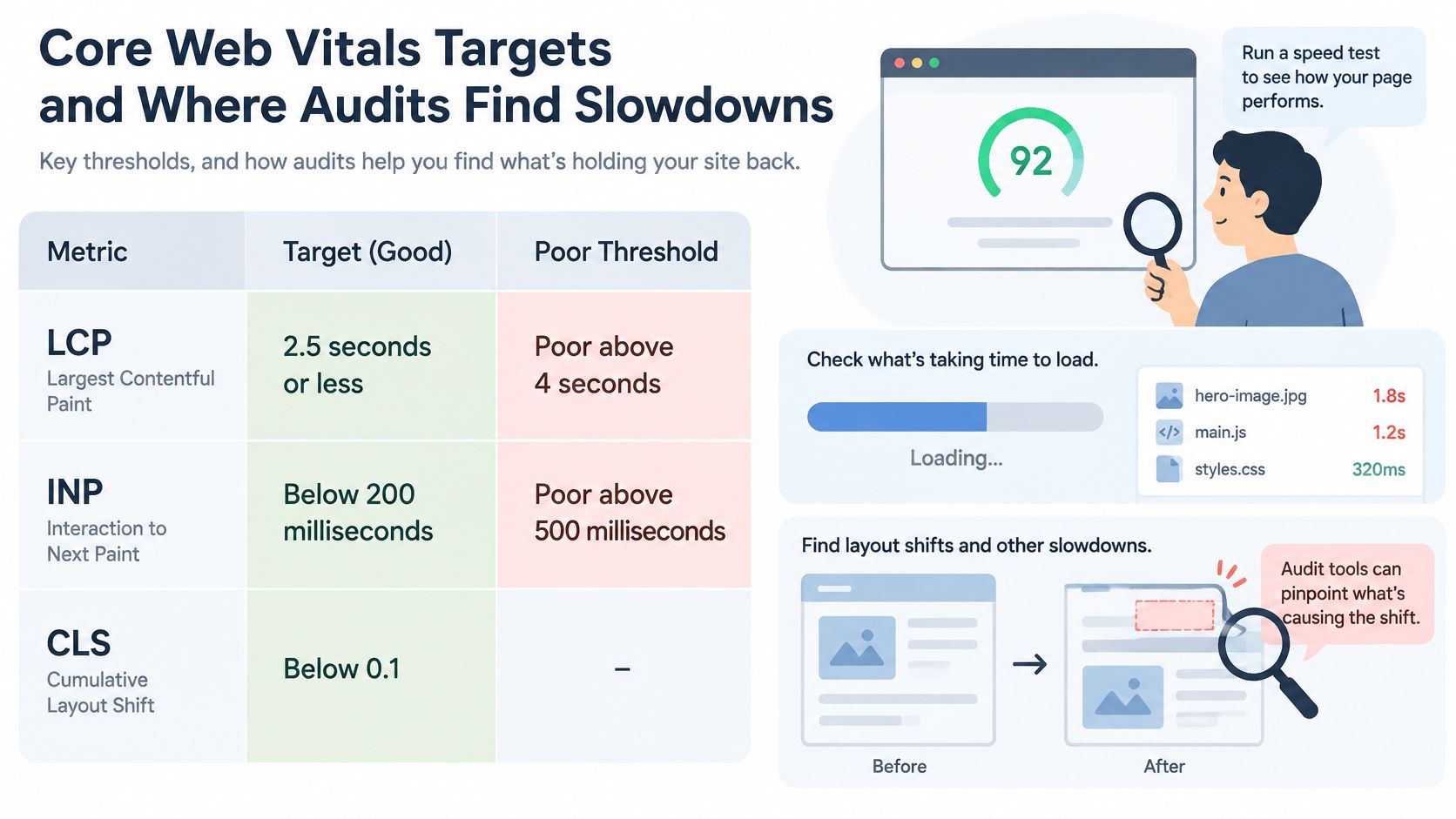
| Metric | Good | Poor | Origins rated good (July 2026) |
|---|---|---|---|
| LCP (loading) | 2.5 seconds or less | Above 4 seconds | 68.3% |
| INP (interactivity) | Below 200 milliseconds | Above 500 milliseconds | 85.7% |
| CLS (layout stability) | Below 0.1 | Above 0.25 | 81.6% |
Shopify's UK guidance on website benchmarking states that Google's good thresholds are an LCP of 2.5 seconds or less, INP below 200 milliseconds and CLS below 0.1, measured at the 75th percentile of visits. The same analysis reports that only 68.3% of tracked origins achieved good LCP in the July 2026 Chrome UX Report, compared with 85.7% for INP and 81.6% for CLS.
Loading is the weakest of the three at population level. An audit that assumes interactivity or layout shift is always the main problem will send engineers at the wrong scripts.
Segment before you brief a developer
Field data should be split by landing-page template, mobile versus desktop, and UK versus non-UK traffic. Failures then map to hero media, app embeds, tracking scripts, fonts and theme code. Rank the fixes by affected organic sessions and commercial value, and state uncertainty where field data is thin. A single Lighthouse score is a lab clue, not a verdict.
Our performance and code analysis measures site speed, reviews code quality and looks for inefficient scripts and app conflicts. That is the practical layer under the percentiles. For a fuller pass on the three metrics, use a Core Web Vitals optimisation review alongside the template splits.
A clean rebuild can still regress
Say a Shopify Plus rebuild ships with lean theme code, then the tag manager, a reviews app and predictive search are added in the same week. Lab scores on the staging homepage stay green. Real-user LCP on mobile collection pages slips because the hero waits on a third-party script. The audit should name that script, the template and the organic sessions on it, then let you decide whether the app earns its delay.
In Search Console, open the Core Web Vitals report, switch between mobile and desktop, and group URLs. If a collection or product group is marked poor while the homepage is not, that group is the first engineering ticket.
Accessibility Failures That Hurt Search and Sales
Accessibility is not a compliance appendix you attach after the SEO work. The same defects that block a disabled shopper also make templates harder for a crawler to interpret, and they sit on the URLs that take organic traffic into the cart.
An analysis of the country's 100 most popular retail brands, reported by Level Access, found that 84% had homepage issues capable of creating critical barriers for disabled users, and every homepage tested had at least one WCAG 2.1 AA violation. Common defects were low text contrast, incorrect heading structures, missing image alternative text and unnamed navigation regions.
Missing alt text leaves product images without a text equivalent. Unnamed navigation regions blur how categories are organised. Both are reading problems for assistive technology and parsing problems for machines.
Look past the homepage
A separate ecommerce accessibility study covering the UK and other European markets assessed product listings, product pages, carts, delivery and payment flows, not homepages alone. Those templates carry the sales risk. The practical method is to test keyboard and assistive-technology journeys on high-value Shopify Plus templates, link each issue to the template and the organic landing pages it affects, and separate theme fixes from app or content-owner fixes. A Shopify accessibility audit is the right place to hold that backlog so it does not get filed as a design nicety.
Say a collection filter is a row of buttons with no accessible name. A keyboard user cannot tell which control narrows the grid, so they leave. The same unlabelled controls can drop the filtered products out of the category view a crawler is able to follow. That is one theme defect with a search cost and a sales cost, not two projects.
If the fix lives in the theme, every product that uses the theme inherits the failure and the repair.
Start the backlog with an owner on each line: button contrast (designer), heading order (theme), product image alt text (content), labelled navigation (theme) and visible focus states (designer or developer).
Why a Technical Audit Pays Back Its Cost
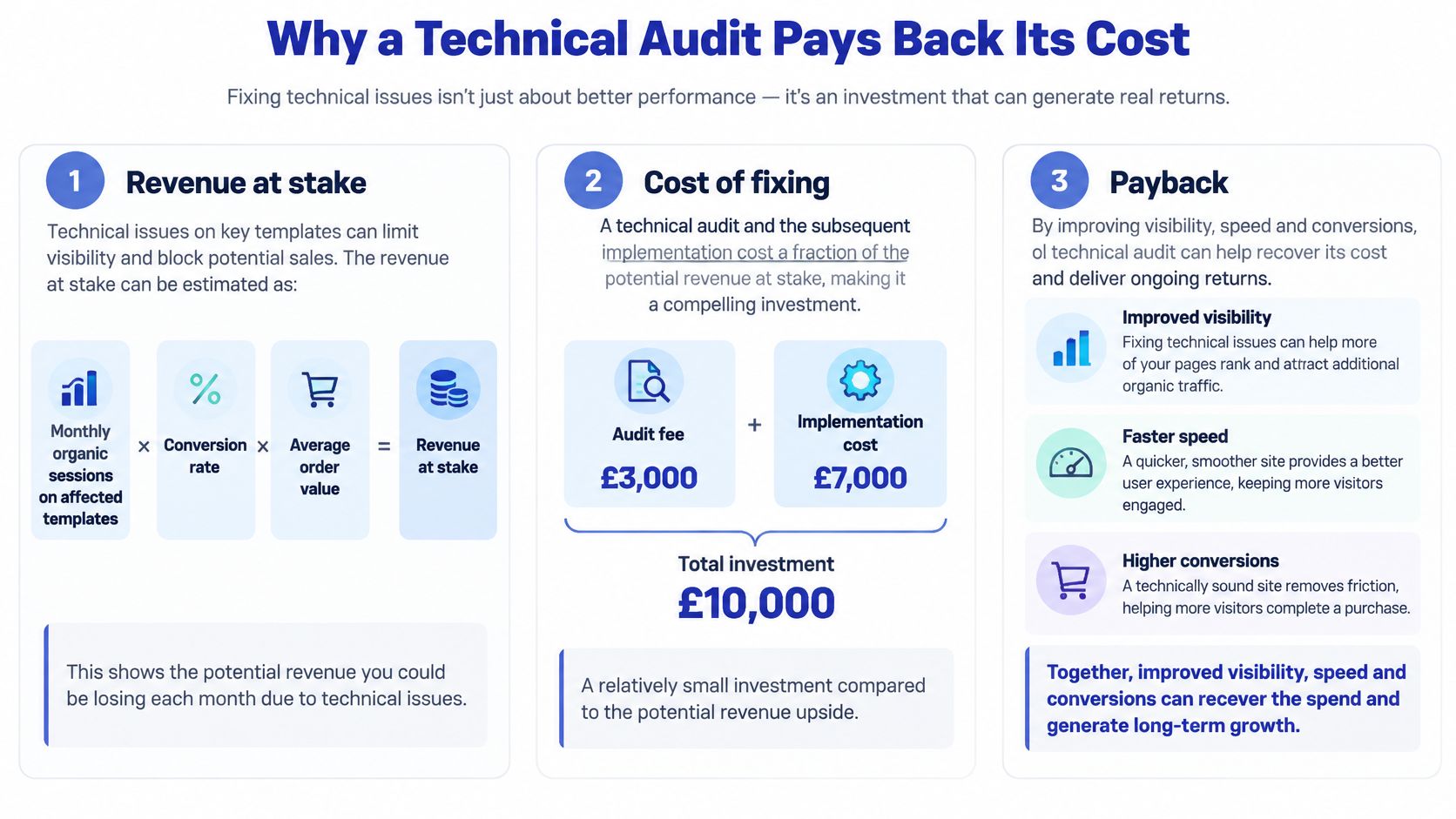
Three checks decide whether the work is worth doing. Size the revenue on the templates you might fix, protect rankings when URLs change, and only approve development hours that defend more revenue than they cost. Our notes on what an SEO audit costs are the place to line fee and build time up against that sum.
Revenue on the affected templates
Use a plain formula. Monthly organic sessions on the affected templates, multiplied by conversion rate, multiplied by average order value, is the revenue sitting on those pages.
Say product templates draw 20,000 organic sessions a month, convert at 1.5% and carry a £60 average order value. That is £18,000 a month on those pages. A visibility lift of 10% on the same rate and order value is £1,800 a month. The figures are an illustration, not a forecast, and they stop you treating every template as equal.
Migrations only hold if the checks happen first
A rebuild keeps rankings when 301 redirects, structured data, canonical tags and sitemap updates are verified before launch. That checkpoint is the audit. Most of our clients retain or improve their SEO performance after a store rebuild or migration, which is the outcome those four checks are there to protect. Skipping them and hoping the new theme "is cleaner" is how collections fall out of the index.
What changed for one fashion retailer
We audited a fashion retailer's store, resolved several theme code inefficiencies and critical SEO mistakes, and the store then had faster page loads and improved search visibility. The fixes were ordered by the organic revenue on the templates they touched, not by how satisfying the code change looked.
An audit pays back only if someone ships the fixes. Estimate the development hours for each item and compare them with the monthly revenue that item protects. If the hours cost more than the sessions at stake, do not approve the work yet.
Checkout and filter fixes also depend on interaction design, not only on markup. The UX design fundamentals from Figr are a useful check when a developer is about to "fix" a control by making it smaller or hiding its label.
The simplest start is the template that drives most organic revenue. Ask for its findings first, and leave the low-traffic blog until that template is re-tested.
Book an Audit That Ends in Fixes
Choose the service with tests, not with a slide of logos.
- Scope: Confirm the work covers SEO, performance and UX, including navigation, product pages, cart and checkout. A crawl-error list on its own is not an audit.
- Ranking: The report must order findings by severity and impact and include step-by-step recommendations with an owner.
- Timeline: Ask for an estimated timeline after the store has been reviewed. A day-count quoted before anyone has seen the catalogue is a guess.
- Who ships the fixes: We implement audit fixes through a one-off project or a monthly retainer, and we prioritise changes against your goals and budget. If the proposal stops at a PDF, budget for an internal developer before you sign.
Commercial terms and the call
A free discovery call is the point where goals and the right approach get agreed. When you book a one-off project or a monthly retainer, a free Shopify store UX audit, valued at $1,500, is included. Bring the preparation items from kickoff: Search Console owner access, analytics admin access, theme access and the top 20 organic landing pages.
The short walkthrough below shows how a store review moves from access checks to a ranked fix list, which is the standard you should hold any proposal against.
Teams launching a companion SaaS tool beside the store often need a separate distribution plan. Directory listings for SaaS products from StartupSubmit are one route for that product, and they should not be confused with the storefront audit.
A good audit has a simple test. Each finding names a template, a fix owner and a measurable target, such as index coverage on that template or a field LCP under the good threshold at the 75th percentile. If a line cannot pass that test, it is not ready for a sprint.
We run Shopify and Shopify Plus audits that connect crawl and index issues, real-user speed and accessibility defects to the templates that earn organic revenue, then implement the agreed fixes as a one-off project or a monthly retainer. If you want that scope rather than another crawler export, book a discovery call and bring your top organic landing pages. Visit Grumspot to set that call up.
Want this kind of work on your store?
Send us the URL and what is slowing it down. We look at the store before we reply.
Related posts
Check out some similar posts.

- on page SEO
On Page SEO Services explained: the deliverables, Shopify process, template speed and accessibility ...
Read more
- what is seo audit
What is SEO audit? Learn how technical, on-page and content checks uncover issues hurting your Shopi...
Read more
- image optimization
Practical image optimization for web that improves Core Web Vitals, SEO and conversions. Format choi...
Read more